Table API (Server)
Overview
The Table and Table Record objects are used to deal with Servicely tables and the records stored in them. They offer a series of functions to query, create, update and delete Table records.
Tables can be accessed by using this generic notation:
Table('User')Where ‘User’ can be replaced with any Table name.
By default, the Table API does not enforce all Permissions and Restrictions (as it is most often used in a context where the Users Permission set is not the intended permission set). If you wish all permissions and restrictions to be applied, you can use the TableProtected method.
TableProtected('User')Naming/case convention
The Table API uses a strict case/capitalisation convention to ensure built in methods, fields and query names do not collide.
Type | Convention | Example |
|---|---|---|
Methods | Begin with lower case letter. | // Test is record is a new record
taskRec.isNewRecord(); |
Fields/Relationships | Begin with upper case letters and words (i.e. CamelCase). Can not begin with a number. | // Get the short description text
taskRec.ShortDescription();// Test if the Short Description has a valuetaskRec.ShortDescription.hasValue(); |
Query methods | All capital letters | // Query all users where the Active flag is true
Table("User").EQUAL("Active", true).query(); |
Table available functions
Function | Returns | Description |
|---|---|---|
newRecord() | Table Record object | Adds an empty new record to the Table |
recordExists(_id) recordExists(_query) | Boolean | Checks whether a particular record already exists in the Table. Two variants are currently supported: using an ID or using a query: // By IDTable('User').recordExists('402881923a065040013a065244210000');// By queryTable('User').recordExists(EQUAL('FirstName', 'admin')); The function will throw InvalidArgumentException if the types are not String (ID) or Criterion (Query). |
query() | Table object (self) | Run the query we built against the Table using the query operators |
addJsonQuery(jsonQuery) | Table object (self) | Adds a JSON query to the current query. These can be obtained from the query builder as mentioned here: GET Request - Retrieving records |
orderBy(_fieldName) | Table object (self) | Returns the rows in ascending order, sorted by _fieldName. |
orderByDesc(_fieldName) | Table Object (self) | Returns the rows in descending order, sorted by _fieldName. |
hasNext() | Boolean | Returns true if there are more records to read in the Table, false otherwise |
next() | Table Record object | Returns the next available record in the Table |
filter(_function) | Array of results, filtered by _function | Runs the query if it has not been run before using query(). Then for each record in the dataset, calls a callback function _function and pass a single parameter to it:
Return result will be an Array containing the return result of each record that passes the _filter function. |
forEach(_function) | Nothing | Runs the query if it has not been run before using query(). Then for each record in the dataset, calls a callback function _function and pass two parameters to it:
Note that each() cannot be chained as it does not return a Table Record. |
map(_function) | Array of results from _function | Runs the query if it has not been run before using query(). Then for each record in the dataset, calls a callback function _function and pass two parameters to it:
Return result will be an Array containing the return result of each invocation of _function. NOTE: If _function returns the Javascript value undefined - that entry will not be included in the result array. To return a 'blank' entry, return null instead of undefined. |
onNoResult(_function) | Table object (self) | Sets a callback function against the Table. This function will be invoked whenever a query execution returns no rows. The callback function only needs to be set once for the entire duration of the object life. The called function receives the Table object as a parameter. |
getFields() | Object | Returns all the fields (direct and reference) of the Table in the form a of key/value pair object. The key is the field name and the value is a Field object. |
getField(_fieldName) | Field object | Returns the Field object corresponding to the field _fieldName |
getRelations() | Object | Returns all the relations of the Table in the form of a key/value pair object. The key is the field name and the value is a Relation object. |
getRelation(_relationName) | Relation Object | Returns the Relation object corresponding to the field _relationName |
getLinkForUI(_optionsObject) | String | Return the UI Link for the given Table type. With no _optionsObject, it simply returns the default link for the Table type. e.g. https://sandbox.servicely.ai/#/User The following are the options available:
{create : true}
Note: The options can be used together, say {create : true, aspect : "SelfService"} Will produce: https://sandbox.servicely.ai/!#/User/_create/SelfService The other options are discussed in the similar method for Table records below on this page. |
|
|
|
Managing batches | ||
maxResults() | Table object (self) | Sets the maximum number of rows to return when querying the Table; this enables the batch mode, explained in this section of the article. |
firstResult(_position) | Table object (self) | Sets the position where to start returning the rows from. |
resultCount() | Integer | Returns the number of rows available in the current batch. Please note that as of Version 1.9.0 it is suggested to instead use the Aggregation API Aggregation API |
.totalResultCount() | Integer | Returns the total number of rows available, regardless of the batch size. Please note that as of Version 1.9.0 it is suggested to instead use the Aggregation API Aggregation API |
.deleteMultiple() | Integer | Will delete all the records matched by the specified query withough |
Table Record available functions
Function | Returns | Description |
|---|---|---|
create() | Nothing | Finalise the creation of the Table record. The new record must be prepared by using newRecord() at the Table object level. |
delete() | Nothing | Delete the Table record. |
update() | Nothing | Update the Table record. |
apply(_object) | Table record | A shortcut for applying a set of field values to the record. Example: rec.apply({
Name: "test",
Active: true,
Status: 0
}); Will set the fields Name,Active, and Status to the appropriate values. Will respect the ‘disableSystemFieldRestrictions’ and ‘disableManagedFieldRestrictions’ options. Will not set system or managed fields if the restriction is in place, but will allow setting the fields if the restriction is disabled. |
applyExplicit(_object) | Table record | Same as ‘apply’ but missing fields will be explicitly set to null. |
isNewRecord() | Boolean | Returns true if the record is new and has not been saved yet. Returns false otherwise. |
clone(_cloneNMRelationships) | Table Record | Clone the Table record and returns the cloned record. At that stage the cloned record does not persist in the database and needs a call to create() to do so. All the field values from the original record are copied onto the cloned one, with these exceptions:
The reference fields point to the same foreign record than the original record. The flag _cloneNMRelationships indicates whether we want the many-to-many relationships to be cloned as well. |
evaluate(_hierarchy, [_successCallback, _failureCallback]) | See description | _hierarchy is a chain of reference fields and finishing with a direct field. evaluate() evaluates this chain and depending on how it's been invoked will return:
The success callback function receives a parameter which can be:
|
getTableName() | String | Returns the name of the Table the record is originated from |
getFieldNames() | List<String> | Returns a list of the associated field names. |
getField(_fieldName) | Field object | Returns the Field object of the field _fieldName. |
getFieldValue(_fieldName) | Variant | Return the value stored in the field _fieldName. The type of the returned value depends on the field type. |
setFieldValue(_fieldName, _value) | Table Record (self) | Sets the field _fieldName with value _value and returns itself. |
getID() | String | Returns the unique ID of the record |
hasField(_fieldName) | Boolean | Returns true if field _fieldname exits in the field collection of the record Table |
getRelationNames() | List<String> | Returns a list of the associated relation names. |
getRelation(_relationName) | Relation object | Returns the relationship corresponding to the _relationName |
enablePermissions() | Boolean | Returns true if Permission checking is enabled, false otherwise. Since 1.7. |
enablePermissions(_boolean) |
| Sets the value of the record Check Permissions flag. |
enableValidation() | Boolean | Returns true if Validation is enabled, false otherwise. |
enableValidation(_boolean) |
| Sets the value of the record validation flag. |
enableTriggers() | Boolean | Returns true if Triggers are enabled, false otherwise. |
enableTriggers(_boolean) |
| Sets the value of the record Triggers enabled flag. |
enableSystemFieldUpdate() | Boolean | Returns true if System Field Update is enabled, false otherwise. |
enableSystemFieldUpdate(_boolean) |
| Sets the value of the record System Field Update flag. |
enableManagedFieldRestrictions() | Boolean | Returns true if Managed Field Update is enabled, false otherwise. |
enableManagedFieldRestrictions(_boolean) |
| Sets the value of the record Managed field restrictions enabled flag. |
enableSystemFieldRestrictions() | Boolean | Returns true if System Field Restrictions are enabled, false otherwise. |
enableSystemFieldRestrictions(_boolean) |
| Sets the value of the record System Field Restrictions enabled flag. |
enableAudit() | Boolean | Returns true if Audit is enabled, false otherwise. |
enableAudit(_boolean) |
| Sets the value of the record Audit enabled flag. |
disableTriggers() | Table Record | Disables processing of any Triggers which would usually execute against the record on creation, update or delete.
|
disableValidation() | Table Record | Disables processing of any Table of Field Validation which would usually execute against the record on creation or update. |
disablePermissionChecks() | Table Record | Disables processing of any Table of Field Permission checks which would usually execute against the record on creation or update. |
disableSystemFieldUpdate() | Table Record | Disables the updating of the System managed field (e.g. UpdatedBy, UpdatedOn, etc). |
disableSystemFieldRestrictions() | Table Record | Disables the restrictions on updating System Fields. |
disableManagedFieldRestrictions() | Table Record | Disables the restrictions on updating Managed Fields. |
disableAllValidation() | Table Record | Disables all of the above validation checks:
Note: This method does not disable triggers (as that is not validation). |
displayValue() | String | The display value for the record |
getLinkForUI(_optionsObject) | String | Return the UI Link for the given Table record. With no _optionsObject, it simply returns the default link for the record, e.g. "https://sandbox.servicely.ai/#/User/4028818a3a2f75cc013a311ffad60000". The following are the options available:
{aspect: "SelfService"}
{objectOnly: true} Will produce: https://sandbox.servicely.ai/!#/User/4028818a3a2f75cc013a311ffad60000 Note: The options can be used together, say {aspect : "SelfService", relative : true, objectOnly : true}
|
doesRecordViolateUniqueConstraints() | Boolean | Checks to see if the record would violate any unique constraints if saved. |
questions() | QuestionTableRecordWrapper | If the record was created from a Catalog item, provides access to the questions and answers. |
Field available functions
Function | Returns | Description |
|---|---|---|
evaluateScript(_scope) | Result of the Script evaluation | If the field is 'Code' field, the script will be evaluated using the supplied _scope object. Note: Only available for Fields of type Code Example: triggerRec.ScriptField.evaluateScript({ current: Table("Incident").newRecord(), type: "test"}); will evaluate the script, and make the properties 'current' and 'test' available to the script. |
displayValue() | String | The display value for the field |
Relation available functions
Function | Returns | Description |
|---|---|---|
displayValue() | String | The display value for the relation |
isSingleResult() | Boolean | Returns true if the relation is a type that will return at most a single record. |
relationType() | String | Returns the type of the relation. |
name() | String | Returns the name of the relation |
parentTableName() | String | Returns the Table name of the parent reference |
targetTableName() | String | Returns the Table name of the target reference |
hasIntermediateTable() | Boolean | Returns true if the relation has an intermediate Table (i.e. it is a Many-to-many relationship |
intermediateTableName() | String | Returns the name of the intermediate Table (null if is doesn't exist) |
intermediateTableParentField() | String | Returns the name of the Intermediate Table parent field (null if is doesn't exist) |
intermediateTableTargetField() | String | Returns the name of the Intermediate Table target field (null if is doesn't exist) |
getI18nKeyName() | String | Returns the I18n key associated with the relationships name (Label) |
getI18nKeyDescription() | String | Returns the I18n key associated with the relationships description |
addRelatedRecord(TableRecord) | TableRecord | Adds a record to the relationship. Returns the created record. |
getRecord() | TableRecord | Returns the related record for a single-result relationship |
isConnected() | Boolean | Returns true if the Relationship is connected to a record instance (i.e. whether it is related to an actual data instance) |
each( function(TableRecord) ) / forEach( function(TableRecord) ) |
| Allows the related records to be iterated through |
map( function(TableRecord) ) | Array of function result | Allows the related records to be iterated through and an array to be constructed with the result of the calling function. |
canRead() | Boolean | Returns true if the record can be read. |
canWrite() | Boolean | Returns true if the record can be written to. |
Setting relationship values
Single relationship
Setting the value of a single result relationship is the same process as setting any other field. You can set the value by assigning either the String ID of the target record, or by supplying a reference to the record itself.
// Get an incident record
let incident = Table("Incident", "INC0000003");

// Get a user to associate
let user = Table("User", "admin");

// Valid
incident.Requestor(user);

// Also valid
incident.Requestor(user.ID());
Multiple relationship
Setting the values of a Multiple relationship is similar to setting a field or single relationship, except that you can also specify multiple records to associate.
// Get a user to associate
let user = Table("User", "admin");

// Get a set of Groups to associate
let groups = Table("Group").STARTS_WITH("Name", "Support");

// Set the users groups to this set
user.Group(groups);
You can also incrementally add records to a multiple relationship.
// Get a user to associate
let user = Table("User", "admin");

// Get a set of Groups to associate
let newGroup = Table("Group", "CAB");

// Add the new relation, preserving the existing relationships
user.Group.addRelatedRecord(newGroup);
Accessing a single record
Although accessing a single record is simply a particular instance of a query, Servicely offers quicker ways of achieving this and thus avoiding longer constructs.
If you have an ID in your hand, the best way to fetch the corresponding record is to use this statement:
Table('User', '4028818a3a2f75cc013a311ffad60000').UserName(); // this retrieves User with ID 4028818a3a2f75cc013a311ffad60000, then the value stored in its field called UserNameIf you want to query the Table by using one or more of its fields, you can use the Table Query syntax:
Table('User', EQUAL('UserName', 'chrisjones')).getFieldValue('FirstName'); // this retrieves User with ID 4028818a3a2f75cc013a311ffad60000, then the value stored in its field called FirstNameOther ways to retrieve a record, is shown below using an example Incident. All methods return the same result.
// Incident INC0000004 has ID of e3d81aa0370911f1b4aae29497089406
Table("#/Incident/INC0000004");

Table("Incident", EQUAL("Number", "INC0000004"));

Table("Incident", "e3d81aa0370911f1b4aae29497089406");

Table("Incident", EQUAL("ID", "e3d81aa0370911f1b4aae29497089406"));
In case you're after one single record, it is better to use those constructs instead of a complete query, as you can directly chain functions like in the example above. It helps to write concise, readable code.
Note that:
- Both those constructs directly return a Table Record object;
- The platform will throw an exception PLATFORM-10007: No record found if the query returns no row;
- The platform will throw an exception PLATFORM-10003: Multiple records were returned when a single record was expected if the query returns more than one row.
It is highly recommended to catch those exceptions and properly handle them in your code
Accessing field values
Finding field name
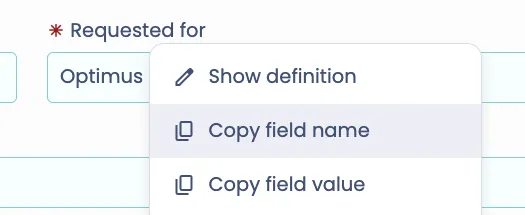
You will need to know a field's name prior to configuring your script to get its values. Recommended way to do that, is to find the field on the form of the Table you want to interrogate, right click on the field and left click on "Copy field name". This will place the field name into your clipboard:
Accessing the current value
The current value of a Table field content can be obtained by using one of these three approaches:
// Using the getFieldValue() shortcut: neater and easier to read. This is our favorite!
Table('User', EQUAL('UserName', 'chrisjones')).FirstName();

// Using the getFieldValue() functionT
able('User', EQUAL('UserName', 'chrisjones')).getFieldValue('FirstName');

// Going through the Table Field object
Table('User', EQUAL('UserName', 'chrisjones')).getField('FirstName').getValue();
Checking the presence of a value
The presence of a value can be verified by using the Field Table function hasValue():
if (Table('User', EQUAL('UserName', 'chrisjones')).FirstName.hasValue()) {
    // Do something
}
Retrieving the original value of a field
When a server side script is executed on a trigger, the value that was in the field before invoking the trigger can be retrieved by using the Field Table function getOriginalValue(). For example the following script, stored in a on-before trigger, will save the previous first name in a field called comments before the update is committed:
var oldValue = current.FirstName.getOriginalValue();
var newValue = current.FirstName();
var hasChanged = (oldValue != newValue);
if ( hasChanged ) {
     current.Comments('Previous first name was: ' + oldValue);
}
Determining whether a field has changed
The above example can be simplified by using the 'hasChanged' method of the Field object.
 if ( current.FirstName.hasChanged() ) {
     log.debug('Value has changed');
 }
Accessing related list
To get a record's related list of records, you will need to find the related list's field name. Similar to getting a regular field's name, you need to right click on the related list's label, and then left click on "Copy field name" to copy the related list's field name onto your clipboard:
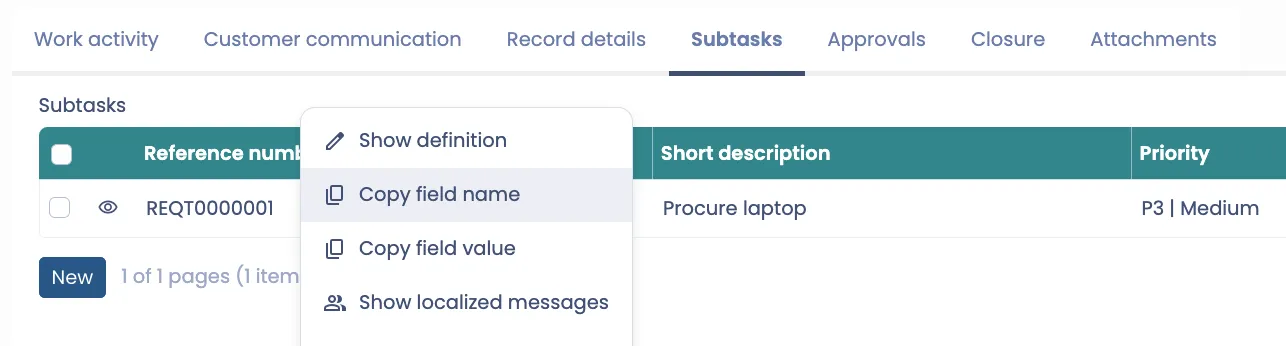
You can then access what's in the related list and it will be returned in an array of TableRecord objects, with each representing a record in the related list.
Table("#/ITSMRequest/REQ0000001").ParentRequestForITSMRequestTasks().forEach(rec => {
    log.info(rec.displayValue()); // This will display each of the related ITSMRequestTask's Number
});
Setting field values
Setting a value for a primitive type
Just like for accessing a value, setting a value supports three approaches. In the examples below we set the first name of a user to 'Simon':
// Using the setFieldValue() shortcut: neater and easier to read. This is our favorite!
Table('User', EQUAL('UserName', 'chrisjones')).FirstName('Simon');

// Using the setFieldValue() function
Table('User', EQUAL('UserName', 'chrisjones')).setFieldValue('FirstName', 'Simon');

// Going through the Table Field object
Table('User', EQUAL('UserName', 'chrisjones')).getField('FirstName').setValue('Simon');
Setting a date value
The easiest way to set a date is to use the global DateTime object. See the Table API and Table Record objects article for more information about handling dates and times with Servicely:
Table('User', EQUAL('UserName', 'chrisjones')).BirthDate(DateTime.withDate(1970,6,11)).update();Setting a value for a reference
A reference field can be set by setting either the ID of the target record or the Table Record itself:
var scheduleRec = Table('Schedule', EQUAL('scheduleNumber', 'SCH-12'));

// Valid
Table('User', EQUAL('UserName', 'chrisjones')).Schedule(scheduleRec);

// Also valid
Table('User', EQUAL('UserName', 'chrisjones')).Schedule(scheduleRec.getID());
Setting the value to empty
Use the Javascript null value to reset the value of a field and make it empty:
Table('User', EQUAL('UserName', 'chrisjones')).Schedule(null);Querying data
Queries are executed by using different functions on a Table object. Different approaches can be used depending on the complexity of your query. This chapter also explains how to process each row and how to handle the situation where no rows are returned.
Contrary to single record access that returns a Table Record object, query constructs explained in this chapter return a Table object. Access to the records of this Table therefore requires the use of the next() or each() function.
Both simple and complex queries use the same set of operators, explained below. Complex queries will combine several operators whereas simple queries typically only use one. Although there are no fundamental differences between simple and complex queries, we considered that introducing the concept in two steps makes it easier to understand how the Servicely query engine works.
Query operators
The following table is a list of the supported queries. They be used alone (for simple queries) or combined by using AND(), OR() and NOT() operators.
Operator | Description |
|---|---|
EQUAL() | The simplest operator implementing a strict equality. For example: Table('User').EQUAL('FirstName', 'jacques'); |
NOT_EQUAL() | Not Equal: the reverse of EQUAL(): Table('User').NOT_EQUAL('UserName', 'chrisjones'); |
LIKE() | Search for records by using wildcards. The supported wildcards are: *A substitute for zero or more characters_A substitute for a single character[charlist]Sets and ranges of characters to match[^charlist] or [!charlist]Matches only a character NOT specified within the brackets Examples: // All user names starting with 'chris'
Table('User').LIKE('UserName', 'chris%');
// All user names containing the string 'jon'
Table('User').LIKE('UserName', '%jon%');
// All user names where first letter is anything and the rest is 'jones'
Table('User').LIKE('UserName', '_jones');
// All user names starting with 'x', 'h' or 'b'
Table('User').LIKE('UserName', '[xhb]%');
// All user names starting with 'a', 'b' or 'c'
Table('User').LIKE('UserName', '[a-c]%');
// All user names NOT starting with 'x', 'h' or 'b'
Table('User').LIKE('UserName', '[!xhb]%'); |
EMPTY() | Get the records where the value in the field is NULL. Table('User').EMPTY('organization'); Note: If you want to check if a field is NOT empty or NULL, you are able to use this in conjunction with the NOT operator. Table('User').NOT(EMPTY('organization')); |
BETWEEN() | Search for records where the field is between two range limits, like (note the two values forming the interval are in an array): Table('User').BETWEEN('BirthDate', [ new DateTime([1968, DateTime.NOVEMBER, 27]), new DateTime() ]); |
IN() | Get all the records that match one of the values of a list. For example (note the second parameter is an array): Table('User').IN('UserName', ['chris', 'erik', 'mike']); |
GT() GE() LT() LE() | Operator Greater Than, Greater or Equal, Lower Than or Equal, Lower or Equal. Use them like this: Table('User').GT('BirthDate', new DateTime([1968, DateTime.NOVEMBER, 27]));
Table('User').GE('age', 45);
Table('User').LT('BirthDate', new DateTime());
Table('User').LE('age', 45); |
TRUE() FALSE() | Operator to check if a boolean field is either True or False: Table('User').TRUE('LockedOut');
Table('User').FALSE('LockedOut'); |
Combining operators for complex queries
Operator | Description |
|---|---|
NOT() | Reverse the logical result of any constructs. For example: Table('User').NOT(IN('UserName', ['chris', 'erik', 'mike'])); |
AND() | Combine two or more operators and apply a logical AND operation |
OR() | Combine two or more operators and apply a logical OR operation |
SUBQUERY() | Query another table through its Table Relation. This offers a very powerful method for joining multiple tables. The example below prints out all the active users that are NOT a member of the group called "Servicely": Table('User').EQUAL('active', true)
.SUBQUERY(
'group', NE('name', 'SB')
)
.each(printUserName);
function printUserName(_rec) {
log.info(_rec.UserName());
} It is also possible to perform SubQuery operations on tables which do not have a managed relationship (for example - from AvailableValue to LocalizedMessage). The example below prints the Key/Value pairs for all the AvailableValue entries which have a LocalizedMessage starting with the word 'New': Table("AvailableValue")
.EQUAL( "Group", "StateProvince") // Part of the standard query on AvailableValue
.SUBQUERY(
"LocalizedMessage", // The target Table name to link the subquery to
"I18nKey", // The field in the target Table we want to match to the parent Table
"Value", // The field in the SOURCE Table we want to match to the subquery field
AND( // Any additional query parameters for the TARGET Table
STARTSWITH( "Message", "New"),
EQUAL( "Locale", "en_US")
)
)
.each(printKeyAndValue);
function printKeyAndValue(_rec) {
log.info(_rec.Key() + ": " + _rec.Value());
} |
Simple queries
Simple queries typically use one standalone operator in a simple construct like that:
Table('User').LIKE('UserName', 'chris%');Standalone operators can be combined by chaining them, in a construct like this:
Table('User').LIKE('UserName', 'chris%').BETWEEN('BirthDate', [ new DateTime([1968, DateTime.NOVEMBER, 27]), new DateTime() ]);Chaining standalone operators like in the example above is equivalent to an AND.
Complex queries
Complex queries differ from simple ones by the use of NOT, AND and OR operators. Those queries can be built by nesting (that is, combining) different standalone operators. A typical complex query would like this:
// Query pseudo code is: where LastName is empty, OR (UserName like 'dion%' AND LastName = 'Williams'), OR UserName is one of 'chris', 'erik', 'mike'
Table('User')
    .OR(
        EMPTY('LastName'),
        AND(
            LIKE('UserName', 'dion%'),
            EQUAL('LastName', 'Williams')
        ),
        IN('UserName', ['chris', 'erik', 'mike'])
    );
Because some queries can be hard to read, we recommend that complex queries should be presented with indentation (like the example above).
Processing each row
Processing each row returned by the query can be done through a "traditional" iteration traversing the whole dataset and using the query(), next() and hasNext() function. In the following example we process all the inactive users:
var eUser = Table('User').EQUAL('active', false);
eUser.query();

while (eUser.hasNext()) {
    processMyRecord(eUser.next());
}

function processMyRecord(_record, _recNumber) {
    log.info('User #{} login is: {}', _recNumber, _record.getFieldValue('UserName'));
}
However the Table object also offers the each() function. It takes a callback function as a parameter and would be used like this:
var eUser = Table('User').EQUAL('active', false);
eUser.each(processMyRecord);

function processMyRecord(_record, _recNumber) {
    log.info('User #{} login is: {}', _recNumber, _record.getFieldValue('UserName'));
}
Or, in a more condensed way (not necessarilly always recommended from a readibility standpoint):
Table('User').EQUAL('active', false).each(function (_record, _recNumber) {
    log.info('User #{} login is: {}', _recNumber, _record.getFieldValue('UserName'));
});
Handling a zero-row query
A convenient way of handling a situation where a query returned no records is to set a callback function using onNoResult():
Table('User').onNoResult(noResults).EQUAL('UserName', 'doesnotexist').query();

function noResults(_Table) {
    // Do something...
}
Batching the results
It can be sometimes useful not to process all the rows of a query in one shot, but rather process in several batches: this is what the batch mode allows us to do.
A batch size must be set first, which is done by using the maxResults() function:
var myUsers = Table('User').maxResults(5);Then we can use two functions to control our navigation through the batch: resultCount() returns the number of rows in the current batch (between 0 and the size of the batch), whereas totalResultcount() returns the total number of rows (i.e. not taking the batch size into account).
The following example shows how a Table can be queries and walked through using the batch mode:
var Table;

var batchSize = 3;
var startFrom = 0;
var totalRecords = 0;

do {
    // Set the maximum number of results
	Table = Table('User').maxResults(batchSize);

	// Set the starting point
	Table.firstResult(startFrom);

    // Now query the Table, within the limits of the batch
    Table.query();

    // Returns the result count of the query WITHOUT the maxResults applied
    totalRecords = Table.totalResultCount();

	// Show details about the batch
    log.info("Records {} to {} of {}",
        startFrom + 1,
        startFrom + Table.resultCount(),  // resultCount returns just the rows in this particular instance or the query
        totalRecords
    );

    // And the the records we got back
    log.info(Table.each( function(_rec) { return _rec.UserName(); } ).join(", "));

    // Increment our start position
    startFrom = startFrom + batchSize;

} while (totalRecords - 1 > startFrom);  // And start again if we need to...
Creating, cloning, updating and deleting records
New record
Before a new record can be created it must be initialised by using the newRecord() function. This function returns an empty Table Record that can then be used to set the field values and be created. Because accessing the fields via the shortcut function returns the same Table record, multiple operations can be chained to a point where we can initialise a record, set the values and create the record in one construct:
Table('User').
    newRecord().
    UserName('simon.bofrost').
    FirstName('Simon').
    LastName('Bofrost').
    Email('[email protected]').
    BirthDate(DateTime.withDate(1918, 7, 18)).
    create();
You can check whether a record is new (as opposed to already saved) by using the isNewRecord() function.
Cloning
An existing record can be cloned by using the clone() method. This will create a brand new record and copy all the field values of the source record to the cloned one. The method accepts one boolean that indicates whether the many-to many relationships must be cloned as well. In the below example, we clone an existing user and change the first name, last name, login, birth date and email address. Note that the system fields and the fields with a unique constraint are NOT cloned during the process.
Table('User', EQUAL('UserName', 'chrisjones')).
    clone(true).
    UserName('simon.bofrost').
    FirstName('Simon').
    LastName('Bofrost').
    Email('[email protected]').
    BirthDate(DateTime.withDate(1918, 7, 18)).
    create();
Updating
Updating a record can follow the same principle; in the example below we update in one construct the first and last name of an existing record:
Table('User', EQUAL('UserName', 'simon.bofrost')).
	FirstName('Robert').
	LastName('Munster').
	update();
Deleting
Simply use the delete() function to delete a record:
Table('User', EQUAL('UserName', 'simon.bofrost')).delete();Navigating through relations
Consider the Organisation reference field of the User Table and the different possibilities of accessing its value (also see chapter Accessing field values).
The following constructs will return the ID of the user's organisation:
Table('User', EQUAL('UserName', 'chrisjones')).Organization.value();

// or //

Table('User', EQUAL('UserName', 'chrisjones')).getFieldValue('Organization');
Whereas this construct will return the organisation Table Field, giving access to all its functions:
Table('User', EQUAL('UserName', 'chrisjones')).Organization;Finally this one will return the organisation Table Record object:
Table('User', EQUAL('UserName', 'chrisjones')).Organization();As seen before, this latter enables statements like those ones, where we directly access fields from the target record:
Table('User', EQUAL('UserName', 'chrisjones')).Organization().Name()
Table('User', EQUAL('UserName', 'chrisjones')).Organization().getFieldValue('name')
This can be repeated multiple times allowing navigation through several relationships. However bear in mind that each access to a foreign Table will end up making a database round trip.
Table('User', EQUAL('UserName', 'chrisjones')).Organization().Schedule().CreatedOn();Safely traversing the relations
The issue with a construct like the one below:
Table('User', 'chrisjones').Organization().Schedule().CreatedOn());is that we assume all of the intermediate elements (i.e. Organization and Schedule) have values. If either of those items do not have a value, it will lead to a ‘Null Pointer’ error, and the script will fail. A safer way is to use the ‘evaluate’ method, which will check that the hierarchy is valid throughout the entire path.
The following statement will return the organization name is a valid reference, or null if the organization field is empty.
// Returns the actual name of the Schedule, or null if any part of the chain is empty
let scheduleName = Table('User', 'chrisjones').evaluate('Organization.Schedule.Name()');

// Returns the Name *field* of the schedule (note: no '()' at the end)
let scheduleNameField = Table('User', 'chrisjones').evaluate('Organization.Schedule.Name');
When evaluating a hierarchy, we can also indicate that we want a specific function to be called upon success and failure. Consider the following code:
let isScheduleActive = Table('User', 'chrisjones')
                        .evaluate(
                            'Organization.Schedule',
                            scheduleRec => scheduleRec.Active(),
                            () => false
                        );
// True if the schedule is found and active, false otherwise
isScheduleActive;

let scheduleDisplay = Table('User', 'chrisjones')
                        .evaluate(
                            'Organization.Schedule.Name()',
                            name => name,
                            () => 'Default text'
                        );

// Will be the Schedule name if the path exists. Will be 'Default text' if there is no Organisation, Schedule, or Name.
scheduleDisplay;
Questions
If a record was created from a catalog item, the questions that were answered as part of the Catalog process can be accessed through the questions API.
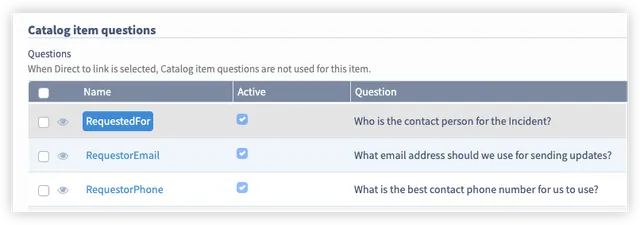
Questions object available functions
The questions object is similar to a TableRecord object. It has all the same methods and properties except the additions below.
Function | Returns | Description |
|---|---|---|
asList() | List<QuestionResponse> | A list of the Questions and Answers in question order. |
<QuestionName> | QuestionResponse | Returns a QuestionAndAnswerTableRecord that contains methods to access the Question and Answer responses. |
QuestionResponse available functions
The QuestionResponse object is a wrapper around a Field object or Relation object (depending on the Question type). All the same methods and properties are available, with the addition of the methods below.
Function | Returns | Description |
|---|---|---|
hasAnswer() | Boolean | True if an answer is present. |
answer() | TableRecord | The actual answer TableRecord. |
question() | TableRecord | The actual question TableRecord. |
prompt() | String | The prompt associated with the question (in the current users language). |
promptI18n() | String | The i18n key associated with the questions prompt. |
value() | Object | (Field type only) The value of the answer. |
displayValue() | String | (Field type only) The displayValue of the answer if the question is related to. |
let questions = current.questions();

// Questions can be accessed directly by their 'Name'
log.info(`RequestedFor Question: ${questions.RequestedFor.value()} DisplayValue: ${questions.RequestedFor.displayValue()}`);

// All question names. e.g.
// ["RequestedFor","ShortDescription","Description","RequestorEmail","RequestorPhone"]
let allQuestionNames = questions.asList().map(question => question.Name());

// All question prompts. E.g.
// ["Who is the contact person for the Incident?","Please provide a short, one line summary of your issue.","Please provide any additional information that may help us in dealing with your issue.","What email address should we use for sending updates?","What is the best contact phone number for us to use?"]
let allQuestionPrompts = questions.asList().map(question => question.prompt());

// All name/display value pairs. E.g.
/* {
  "RequestedFor": "Andrew Venn",
  "ShortDescription": "Testing catalog questions",
  "Description": "Demonstrating the API",
  "RequestorEmail": "[email protected]",
  "RequestorPhone": "555-555 5555"
}
*/
let allQuestionMap = questions.asList()
    .reduce((map, question) => {
        map[question.Name()] = question.displayValue();
        return map;
    }, {});