UI Event
A UI Event automates business logics on a Servicely Table’s form and/or fields as they are loaded or as you interact with them on your web browser, i.e. doing field updates or saving your changes on the form.
- It runs on the client side (your computer’s web browser)
- It can hide/unhide fields and containers.
- It can make fields to be mandatory and/or read only
- It can call System Controllers to run server side functions (also refer to Table API (Server) )
- It has access to the current record displayed on the form
- It has access to classes and functions within client accessible Application Properties (refer to Application Properties )
Javascript knowledge is required
Creating a UI Event
Field name | Field type | Description | Sample value |
|---|---|---|---|
Name | String | Name of the UI Event for administrative purposes | Incident - Set Requested for based on selected Requestor |
Event type | Choice | Whether the UI Event is to run based on a field or a form:
| Field event |
Event name | Choice | Action taking place that should result in this UI Event run: If Event type is “Field event”, the valid events to choose from are:
If Event type is “Form event”, the valid events to choose from are:
Only for “On form submit”, your script can return either true or false to decide whether or not to allow the form’s submission (create or update of a record) to proceed. | On change |
Active | Boolean | When active, the UI Event will be available to run should it meets the configured events | Yes |
Table | Reference | Table the UI Event applies to | Incident |
Field | Reference | Available if Event type is “Field event”. The UI Event runs when the Field’s value on the form has been updated. | Requestor |
Application | Reference | Application that the UI Event is packaged under | itsm |
Description | String | Provides more details about what the UI Event is for, for administrative purposes | When a Requestor is set on an Incident, copy them across as an Incident’s Requested for if it isn’t set already |
Script | Script | Client side script the UI Event runs. The script has access to:
ℹ️ For “On form submit” event: Provide a return false; if you need to prevent a form’s submission. Not providing a return value is the same as providing a return true; statement | if (current.Requestor.hasValue() && !current.RequestedFor.hasValue()) { current.RequestedFor(current.Requestor.value());} Please refer to the Examples section below for other examples/use cases. This primarily uses theTable API (Client) Table API and User Object (Client and Server)User Object (Client side only). |
Examples
Make Assignee required only when status is not new for a viewAspect called “ServiceDesk”
Field | Value |
|---|---|
Name | Incident - Always for ServiceDesk aspect |
Event type | Form event |
Event name | On form load |
Active | Yes |
Table | Incident |
Description | When viewAspect is “Service Desk” and status is not new, always set the assignee to be required. Otherwise keep optional. Keep hidden for all other aspects. |
Script | if (viewAspect == “ServiceDesk” && current.WorkflowStatus() != “new”) {
current.Assignee.visible(true);
current.Assignee.required(true);
} else {
current.Assignee.required(false);
if (viewAspect != "ServiceDesk") {
current.Assignee.visible(false);
}
} |
Unhide a field set container when an Incident's status is Completed
Field | Value |
|---|---|
Name | lncident - Always for Completed status |
Event type | Form event |
Event name | On form load |
Active | Yes |
Table | Incident |
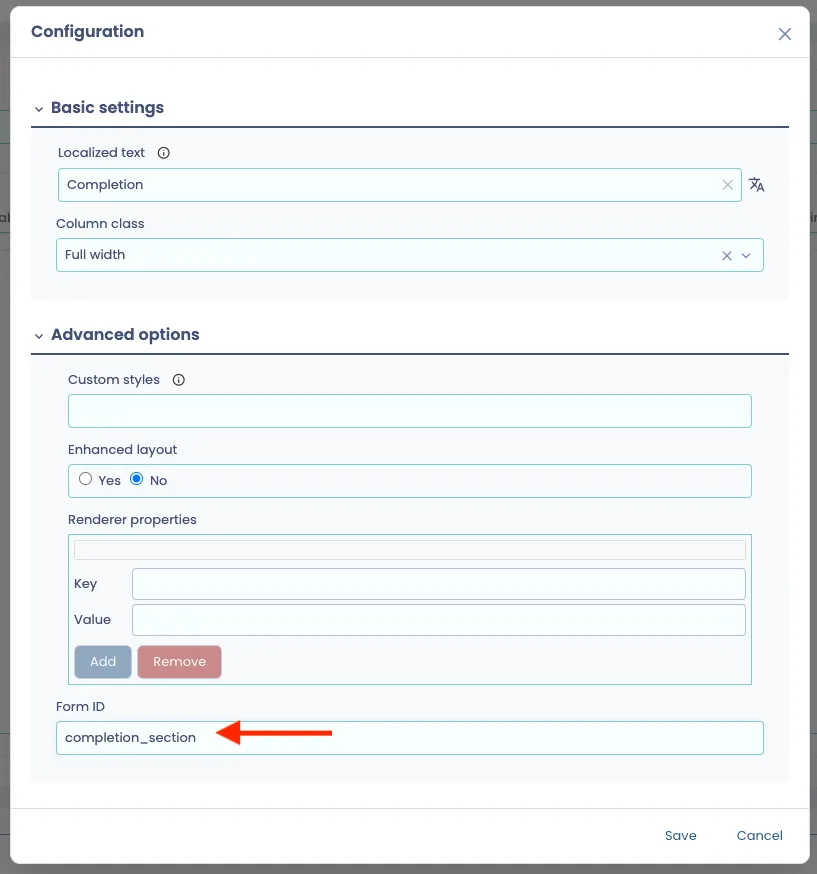
Description | When status is "Completed", unhide a field set container named "completion_section", otherwise hide it |
Script | if (current.WorkflowStatus() == “completed”) {
current.getUIElements("completion_section").visible(true);
} else {
current.getUIElements("completion_section).visible(false);
} |
The function current.getUIElements() takes in the "Form ID" of the layout element.
The getUIElements() functions are:
Function name | Purpose |
|---|---|
selectTab() | To have the element selected (if it is a tab) |
visible(boolean) | Set visible(true) to show the element and visible(false) to hide the element |
Example below is a "Field set container" layout element. For more information on layout elements, you can refer to Form Layoutsform layout.
Default an Incident’s Location based on Requestor’s location data, using a controller
This requires the use of a Controller as we need to query an Incident’s Requestor user record and get their Location.
Field | Value |
|---|---|
Name | Incident - Default Location based on Requestor |
Event type | Field event |
Event name | On change |
Active | Yes |
Table | Incident |
Field | Requestor |
Description | Once a Requestor is selected/updated, if an Incident’s Location is blank, set the Location based on that user record |
Script | //Assuming there is a Requestor, form is not loading, Location is not already set
if (!isLoading && current.Requestor.hasValue() && !current.Location.hasValue()) {
//Create a parameter object to provide with our request to the controller
var requestObj = {};
requestObj.userId = current.Requestor();
//Call the server with the information required.
WS.controller("UserInfoController", requestObj)
.done(function(response) {
current.Location(String(response.data.locationID));
//If there was an error, add it to the console log.
}).fail(function(response) {
console.log("UserInfoController: Start Error");
console.log(response);
console.log("UserInfoController: End Error");
});
} Refer to below for sample of the Controller. |
System ControllersController “UserInfoController” Script referenced in the UI Event’s script in above example, can look like the following (variable “locationID” is what the Controller returns and the UI Event makes use of):
answer = {};

// Query the User table for the record with the provided userId parameter.
if (userId) {
    let userRec = Table("User", userId);
    if (userRec) {
        if (userRec.Location.hasValue()) {
            answer.locationID = userRec.Location.value();
        }
    }
}

answer;
Default an Incident’s Location based on Requestor’s location data, using a REST call
The UI Event can be configured the same way per the above example with a Controller, but the UI Event script should look like the following instead:
//Assuming there is a Requestor, form is not loading, Location is not already set
if (!isLoading && current.Requestor.hasValue() && !current.Location.hasValue()) {
    REST.get("User", current.Requestor(), { fields: "Location" })
        .then(response => {
            current.Location(response.data.Location);
        });
}