Inbound Messaging
Overview
Servicely can receive inbound messages, and these can be used for common operations such as:
- Create an Interaction or Incident
- Update comments against an existing request, incident, case, etc.
- Create records based on events from a monitoring system
- Basic 2-way integration with another system
For each matching Inbound message configuration, a script is run that can perform the creates, updates, or any other server scripted actions in Servicely.
To access this functionality, navigate to: Administration > Messaging > Inbound messages
The following image shows the configuration form:
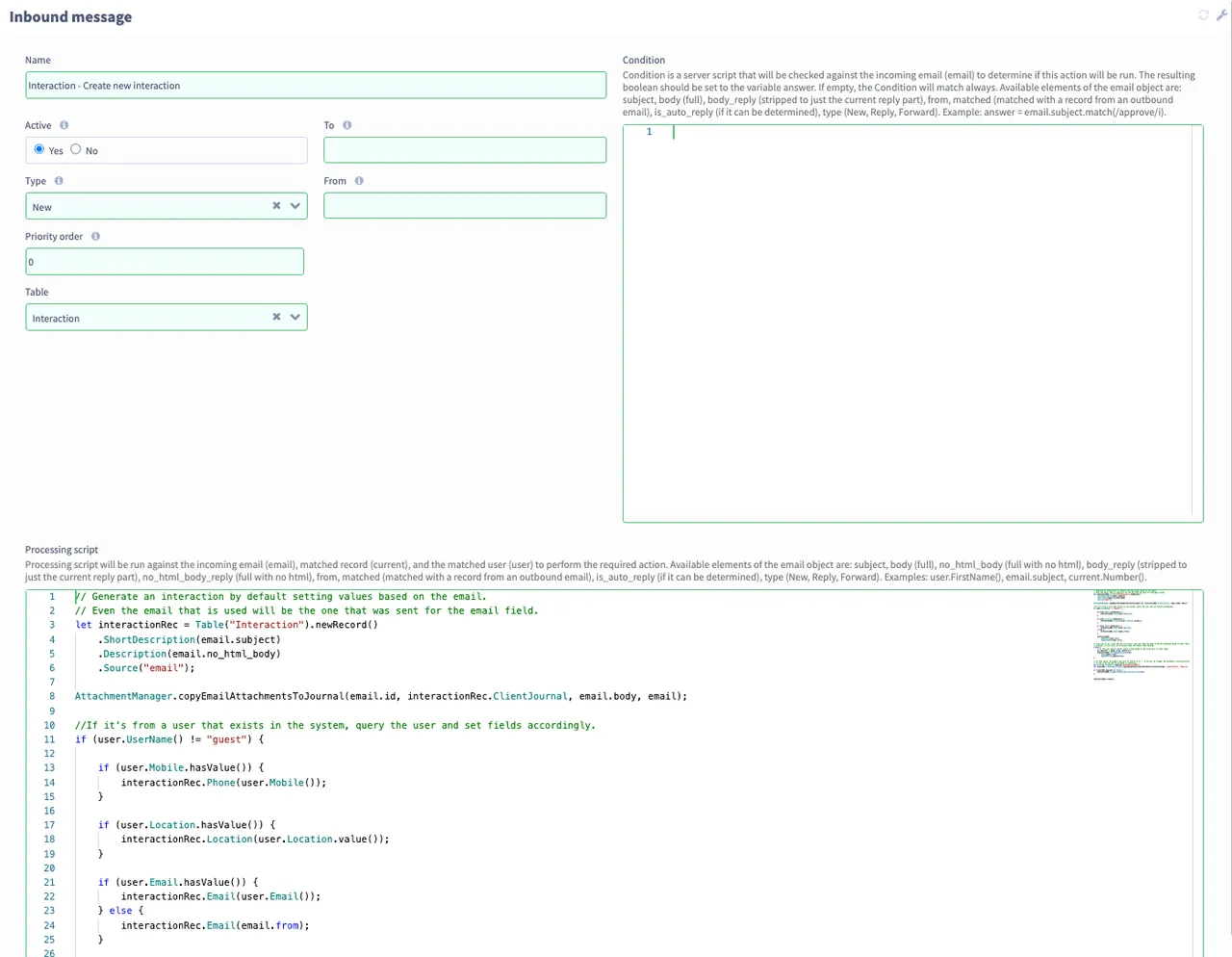
Configuration
The keys parts of the configuration are best thought of as two main concepts:
- Match rules, which are used to select an Inbound message to execute
- The processing script, to perform the required actions
Note: only the first Inbound message that matches the given conditions will be executed.
| Field | Type | Example entries | Notes / Description |
|---|---|---|---|---|
General fields |
| |||
Name | String | "Incident commented" | The logical name used for identification of the configuration only. | |
Matching rule fields |
| |||
Table | Table | Incident | For reply messages (see details on watermark below), match only if this configuration matches the Table associated with the watermark. | |
Type | Choice | New/Forward/Reply | Used to match if the message is a New message, a Forward, or a Reply. | |
To | String | Match only if the To address matches. If not set, matches all To addresses. | ||
From | String | Match only if the From address matches. If not set, matches all From addresses. | ||
Active | Boolean | true | Only Active configurations are candidates for processing. | |
Priority order | Integer | 10 | The priority order in which an attempt to match for processing. The lower the number, the higher the priority. Once a match is found, no further matches are attempted for any recipients who received it, | |
Send to initiator | Boolean | false | This determines whether or not the person who caused this notification to trigger (normally the updated by person) will receive the notification if they are a recipient. | |
User Script | Code | let userRec = Table(“User”) .EQUAL("ID", "c0a8058a68781a95816879122bac36a1") .query();if (userRec.next()) { answer = userRec;} else { answer = user.getRecord()}
| Server script that allows you to script what user is associated to the email processing. This can be useful in situations where you have multiple users with the same email address in the system, or need an inbound message to process emails from multiple addresses to with a certain user. To utilise this feature your instance needs to be on version 1.10 or later. | |
Condition | Code | answer = email.subject.matches(/re/) && email.matches | Server script to use as a condition on the mail for this notification to match. "email" object has body, reply_body (the body stripped of all previous replies), subject, to, from, matched (boolean field set to true if matching watermark found, and hence a record update), type (new, reply, forward) as fields. i.e. email.subject, email.to, etc. | |
Processing fields |
| |||
Send individually | Boolean | false | Determines if the notification should be sent individually, as opposed to including all recipients in the same email. | |
Processing script | Code |
current.Description(email.subject);current.Journal(email.body);current.Requester(user.getID());current.update();
| This is a server script that is executed when a match (per configuration of above fields) is made. Typically this would be to date comments in an existing Incident, Request, etc., or the creation of a new Interaction, Incident, etc. Processing script will be run against the incoming email (email), matched record (current), and the matched user (user) to perform the required action. Available elements of the email object are:
Examples: user.FirstName(), email.subject, current.Number(). See example below for more detail |
Processing script example
The following shows a worked example of creating a new Interaction from an inbound message.
// Create new record
let interactionRec = Table("Interaction").newRecord()
    .ShortDescription(email.subject)
    .ClientJournal(email.body)
    .Description(email.body)
    .Source("email")
    .Email(email.from);

// If it's from a user that exists in the system, query the user and set fields accordingly.
if (user) {
    let userRec = Table("User", EQUAL("ID", user.getID()));
    if (userRec.Mobile()) {
        interactionRec.Phone(userRec.Mobile());
    }
    if (userRec.Location()) {
        interactionRec.Location(userRec.Location().getID());
    }
    interactionRec.Requestor(user.getID())
        .RequestedFor(user.getID());
}
interactionRec.create();
Update record matching
All outbound messages from Servicely have a watermark added, such as: sbx:msg0000023. When such a message is replied to, the inbound message processing will match this watermark with the record that triggered to outbound message, opens that records, and makes available as current, in the same way as other scripting in Servicely. This allows for comments to be added to the Client journal, say, of the same record and allow that to be updated. Note: The Processing script will require current.update(); to be performed after all other updated have need done, to take affect in the underlying record.
User matching
Inbound messages attempt to match the email sender with a user configured in the system. This may be used for setting fields such as Requestor, etc. The user object is available Processing script for setting fields / other decisions.
The user is determined first by searching the User records for a match; if one is found, that user is used. In the case of no matching records in the user table directly, the system will search User email alias records for a match (more details below). If not match is found the user object will not be set.
Email aliases
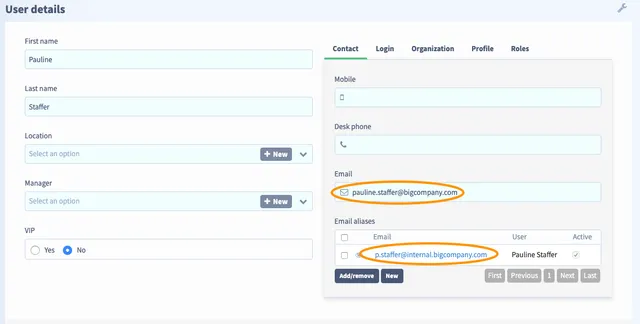
There are situations where a user may be identified by one of numerous email addresses. For instance, a company may have merged, and users are configured primarily under the new company name, but still are using acquired company email address. User email aliases are provided for this situation, where any number of email addresses can configured against a user. Outbound emails for a user will always use the primary email configured in the User record, but for inbound messages, any of the primary or email aliases can be used, and still match to that user. The Email aliases are configured in the related list on the user record (see image below), or may be imported into the UserEmailAlias table.
Handling attachments
Within the processing script, you can determine exactly how attachments are handled.