Query Functions
Query functions are used to dynamically provide a value or list of values based on the current user’s session. There are two different versions of this, depending on what you want to achieve. There are relationship query functions, used for reference and multiple reference fields, and field query functions, used for other field types (primarily datetime fields).
Relationship query functions
The function, once configured and activated, will be available for the purpose of either of the below
Use the lightning bolt icon to show the list of available relationship query functions for the selected field, e.g. Assignee
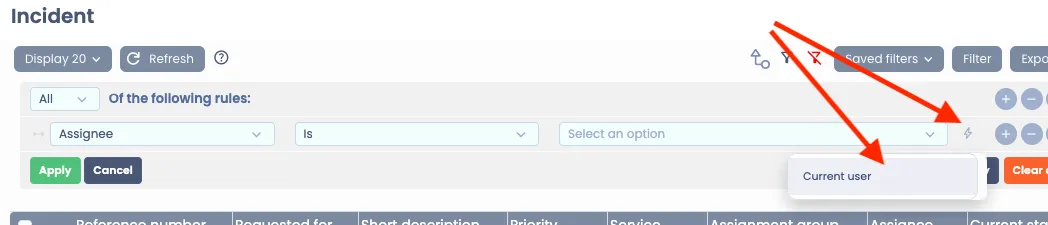
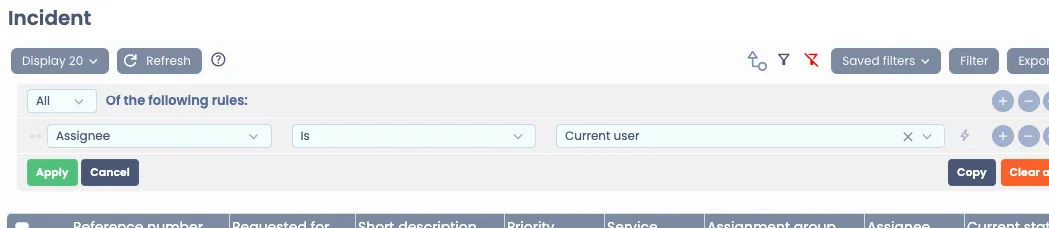
- Adding to a query/filter on a table for a list or a report. Example below is using a Relationship query function named “Current user” to run a query to find Incidents assigned to myself:
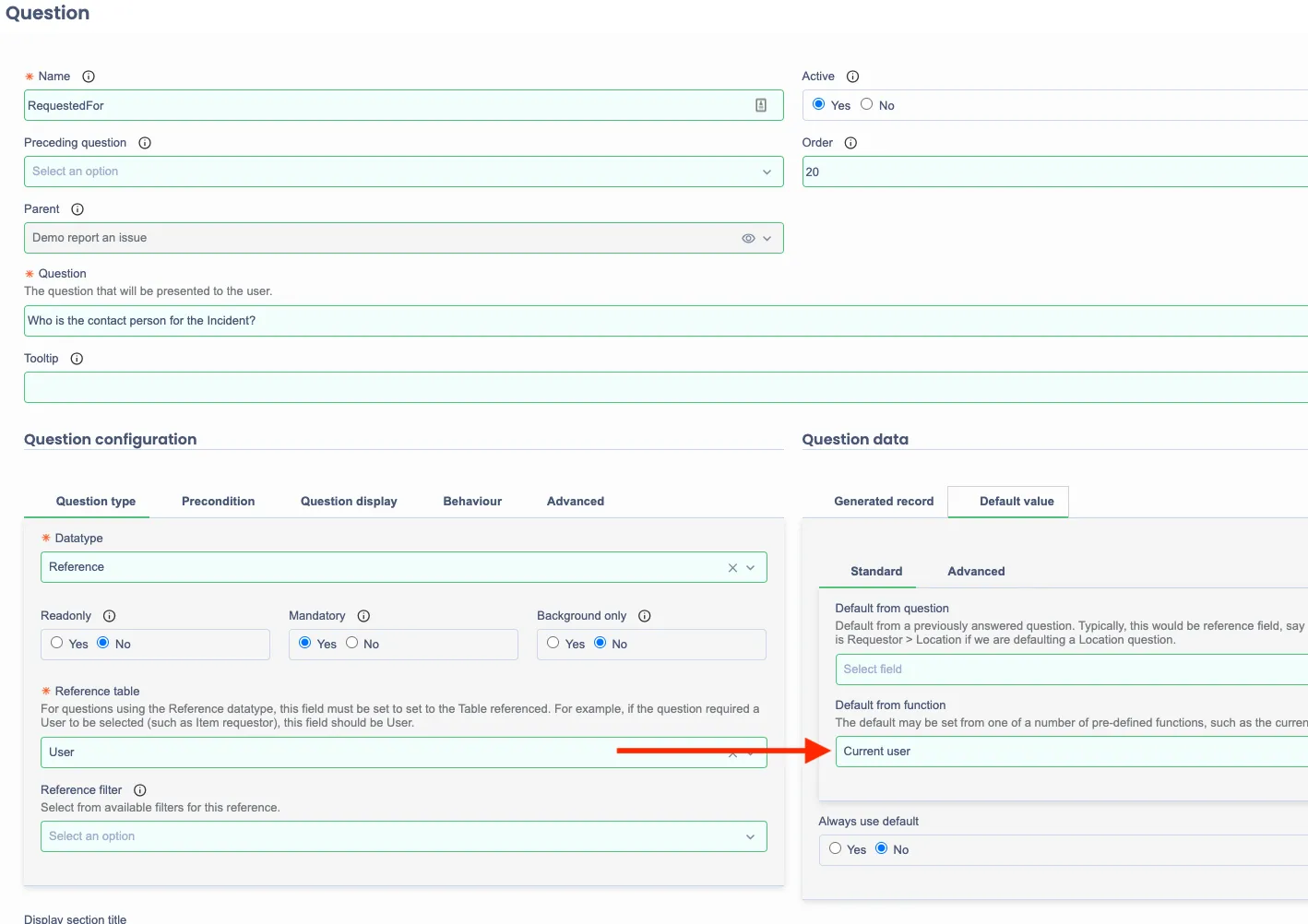
- Defaulting a Catalog item question’s answer. Example below is using a Relationship query function named “Current user” to default a question’s answer to myself:
Creating a Relationship query function
Name | Type | Description | Example |
|---|---|---|---|
Number of expected arguments | Integer | | 0 |
Name | String | Name of this function as shown when selecting it | Current user location |
Function name | String | Function name used when this is executed | currentUserLocation |
Supported entities | List | The function will be available to reference fields/catalog questions to the Tables listed here.For example if Location table is a supported entity, then:When you are setting up a filter for a table using a Reference field that references Location table, you will be able to select the Relationship query functionORWhen you are configuring a Catalog question that references Location table, you will be able to select the Relationship query function record on the “Default from function” field. | Location |
Returns list? | Boolean | Set to Yes if your configuration returns a list | No |
Active | Boolean | Set to Yes to make it available | Yes |
Script | Script | Should provide either list or an item. Last part of the code will be returned back for the query | user.Location.value(); |
Field query functions
The function, once configured and activated, will be available for the purpose of adding to a query/filter on a table for a list or a report. Example below is using a field query function named “YTD” to run a query to find Incidents for this year to date.
Use the lightning bolt icon to show the list of available field query functions for the selected field, e.g. YTD

Creating a Field query function
Name | Type | Description | Example |
|---|---|---|---|
Number of expected arguments | Integer |
| 0 |
Name | String | Name of this function as shown when selecting it | YTD |
Function name | String | Function name used when this is executed | yearToDate |
Supported field types | List | The field types that will have this an option. | date date_time |
Returns list? | Boolean | Set to Yes if your configuration returns a list | No |
Returns range? | Boolean | Set to Yes if your configuration returns a range | Yes |
Active | Boolean | Set to Yes to make it available | Yes |
Script | Script | Should provide either list or an item. Last part of the code will be returned back for the query | let end = DateTime();let start = now.withMonthOfYear(1).withDayOfMonth(1).withTimeAtStartOfDay();[start, end]; |
Other examples
Last year
Name | Type | Description | Example |
|---|---|---|---|
Number of expected arguments | Integer |
| 0 |
Name | String | Name of this function as shown when selecting it | Last year |
Function name | String | Function name used when this is executed | lastYear |
Supported field types | List | The field types that will have this an option. | date date_time |
Returns list? | Boolean | Set to Yes if your configuration returns a list | No |
Returns range? | Boolean | Set to Yes if your configuration returns a range | Yes |
Active | Boolean | Set to Yes to make it available | Yes |
Script | Script | Should provide either list or an item. Last part of the code will be returned back for the query | let end = DateTime().minusYears(1).withMonthOfYear(12).withDayOfMonth(31).toEndOfDay();
let start = DateTime().minusYears(1).withMonthOfYear(1).withDayOfMonth(1).toStartOfDay();
[start, end]; |