Creating a Search Classifier
Classifiers are Natural Language Classifiers that are used to predict the value of fields based on the input of a string field. They are also used to define tables used by Sofi Intelligent Search.
Search Classifiers define the configuration of a search index. Sofi includes a pre-configured Search Classifier which includes all published Knowledge Base articles.
Defining a Classifier
Perform the following steps to create or modify a prediction classifier.
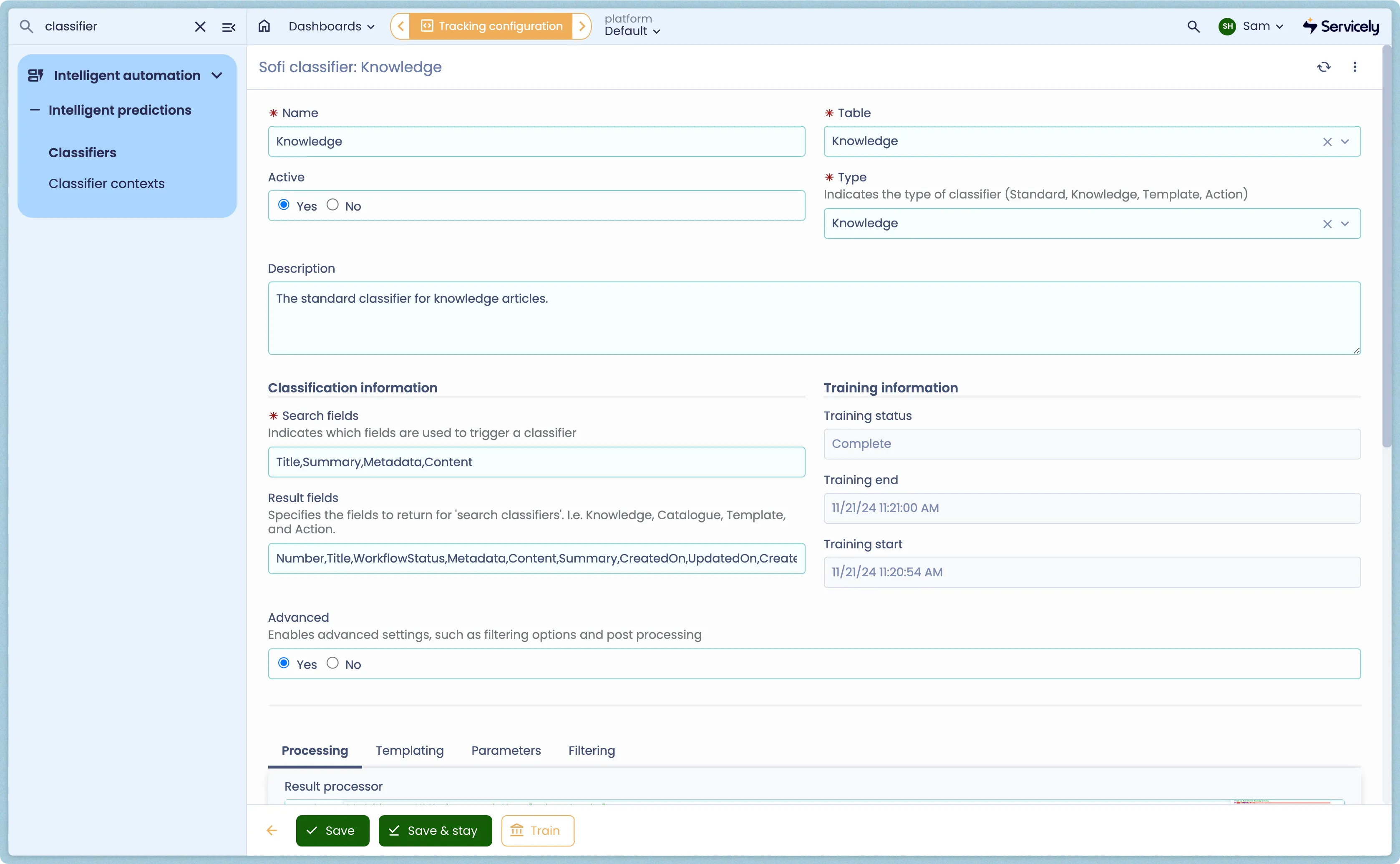
- Navigate to Sofi > Classifiers and Select New
- Configure the following fields:
Mandatory Fields
The following classification fields are mandatory:
The table below provides a list of all of the parameters on a Search Classifier Record.
Field | Description | Notes |
|---|---|---|
Name | Unique name of the Classifier | eg Incident |
Table | Table the classifier reads data from | eg incident |
Status | Status values of the classifier: | Read Only field. Primarily to indicate the status of training |
Type | Classifiers are used for Intelligent Prediction, Search and Response. | For Prediction Classifiers, set Type - Knowledge |
Description | Description of the classifier | |
Restriction | Use this condition builder to restriction / define the source records that will be used to training the Classifier. | For example, you may only want knowledge articles where the Workflow = Published |
Search fields | The fields on the Knowledge articles the are indexed | eg Short description, Text, Meta |
Classification fields | The field value that will be returned by the search | On Search Classifiers this is set to Number |
Training Start | The date / time that the Classifier most recent training started. | |
Training End | The date / time that the Classifier most recent training started. | |
Advanced Configuration
The following section details some of the advanced configuration options for a Classifier.
Classifier Filters
Classifier Filters allow you to define criteria for improving the relevancy of the classifier results. A classifier filter uses information on the current record, such as Location, to restrict the training data taken into account by the classifier.
Field | Description | Notes |
|---|---|---|
Filter field | Classifier uses these fields on the record to filter the results | |
Filter source fields | Classifier uses the Filter source fields to identify the data source used by the Filter field. | |
Other Fields
Field | Description | Notes |
|---|---|---|
Data analytic fields | Used to collect additional information for data analysis. | Internal use only, please leave blank. |
Request parameters | | Internal use only, please leave blank. |
Result processor | | Internal use only, please leave blank. |
Training a Search Classifier
Before Sofi can be used we need train the models, this is done by navigating to the menu Intelligent Automation → Intelligent Predictions → Classifiers. Select the Classifier and then click on the Train Classifier link at the bottom of the form.
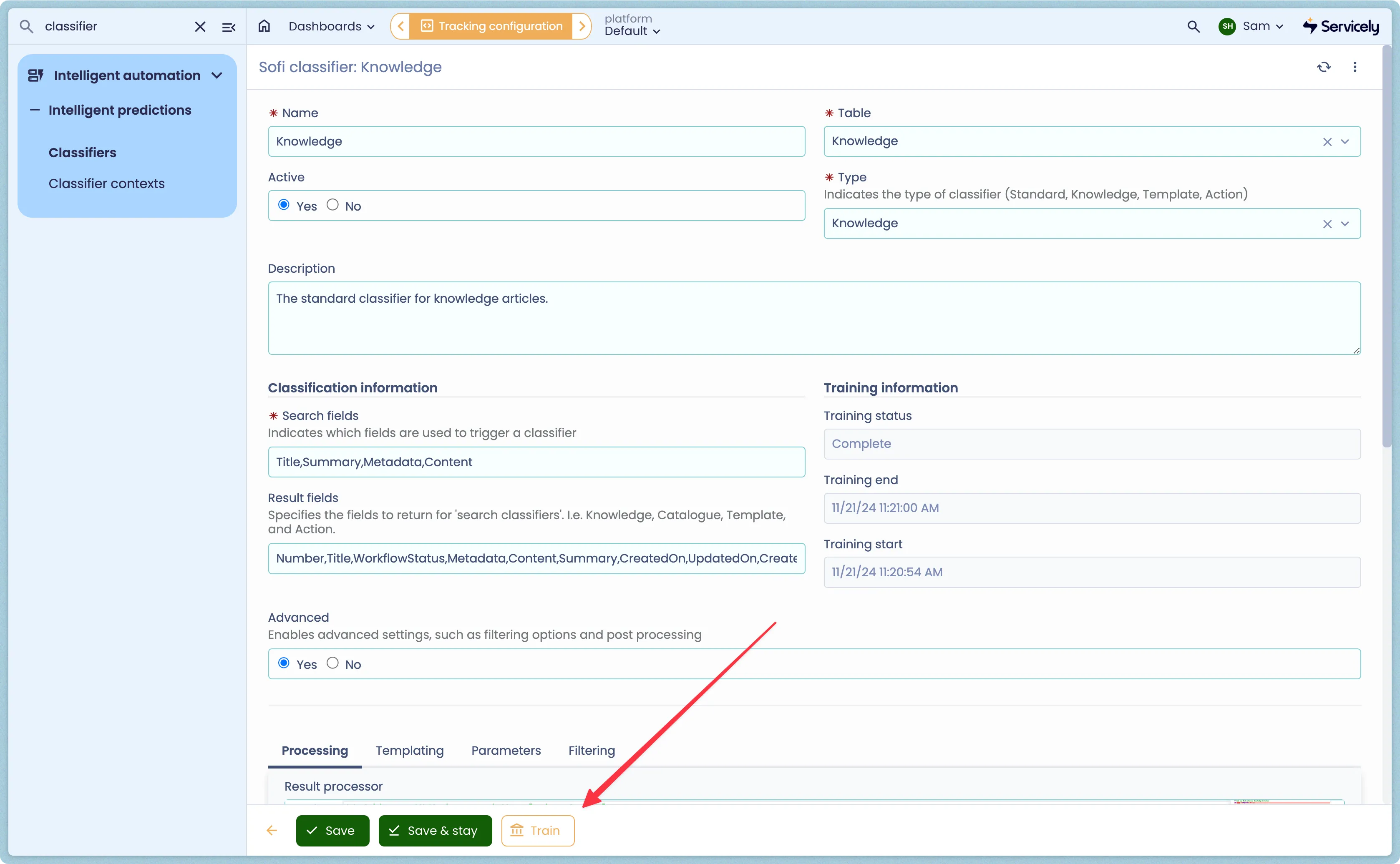
The training duration depends on a number of factors and can take between 20 minutes and a few hours. The Classifier provides a Status field indicating the current state allowing you to confirm when training is complete. Once completed, the Training End field will be populated. Note that during Training, the classifier will still make predictions however the results may be inconsistent.
Estimated Training Duration
As a guide, 100,000 may take 20 mins. 500,000 may take 2 hours. 1,000,000 records may take 4-5 hours.