Table operation
Overview
A table operation is a button or a contextual menu that is used to trigger certain operations.
Examples and types below:
Form
Detail view
Appears at the bottom of a form next to the default Save buttons. Examples include "Classify interaction" and "Set to resolved" buttons on an unclassified Interaction record.

Detail config
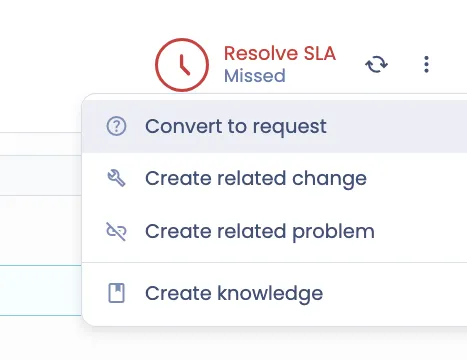
Appears as part of a form context menu group, on the top right of a form, after clicking on the Vertical ellipsis icon. Examples include "Convert to request" and "Create related change" context menu items for an Incident record.
Detail context
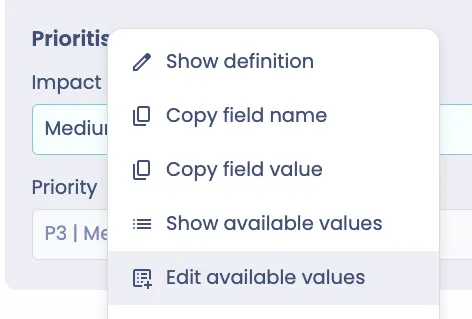
Appears as part of a field context menu group, after right clicking on a field on a form. Examples include "Edit available values" on a choice field as an admin.
Related list context
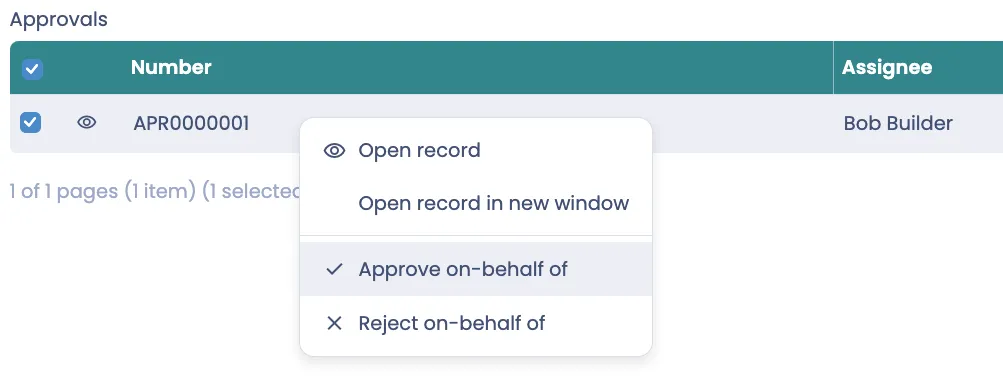
Appears as part of related list context menu group, after right clicking on a record in a form's related list. Examples include "Approve on-behalf of" and "Reject on-behalf of" on an Approvals related list on the ITSMRequest form. Those related list context menus will appear for users with the approval_override role.
List
List view
Appears as a button at the bottom of a list view. Examples include "Import change set" for an admin user in a list of Change set records. The button is used to start a change set import process on the Servicely instance.

List context
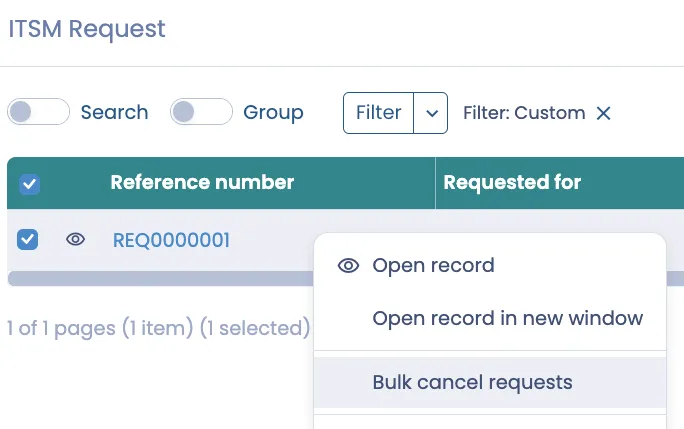
Appears as part of a list view's contextual menu group on selected records, after right clicking on a record in a list view, e.g. list of open ITSMRequest records. Examples include "Bulk cancel requests" on a list of ITSMRequest records.
List config
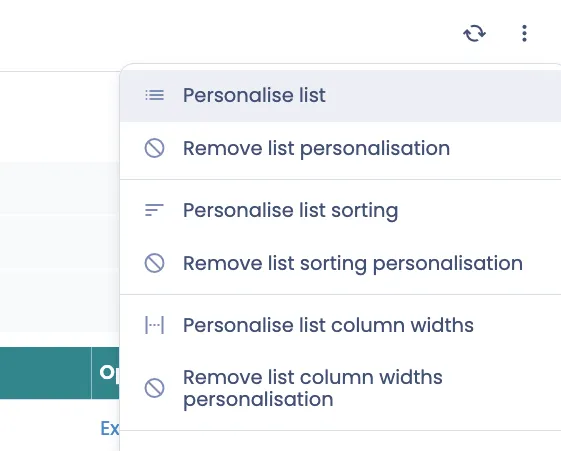
Appears as part of a list view's contextual menu group on top right of a list, after clicking on the vertical ellipsis icon. Examples include "Personalise list" and "Remove list personalisation".
Configuration
Base
Field name | Description | Example value |
|---|---|---|
Name | Name of the configuration | Incident - Convert to request |
Label | Label of the Table operation shown to the users | Convert to request |
Table | Table of records that this Table operation is to be available for Note: For Related list context table operations, the Table needs to be what the Related list is displaying | Incident |
Operation type | Whether to run on server or on client Select "Execute on server" to run server side script such as modifying record(s) Select "Execute on client" to run client side script such as redirecting on to another page | Execute on server |
Is form submit | Select Yes to execute 'On form submit’ UI event handling as part of 'On before' processing of this operation. | Yes |
Active | Activate/Deactivate to show/hide the Table operation | Yes |
Is bulk operation | Determines whether this table operation should be selectable when updating more than one record at a time in a list. Not applicable for Form displayed table operations | No |
Icon | Icon that will display to the left of the table operation label. Select from available options. | |
Do not load full records | Full records are only needed for list operations that use fields not already on the list view in Before and Action client scripts. This is for performance purposes, therefore the preference is for this to be set as Yes, unless necessary | |
Show in list view | Refer to "List view" Table operation type example | No |
Show in detail view | Refer to "Detail view" Table operation type example | No |
Show in list context menu | Refer to "List context" Table operation type example | No |
Show in related list context menu | Refer to "Related list context" Table operation type example | No |
Show in detail context menu | Refer to "Detail context" Table operation type example | No |
Show in list config menu | Refer to "List config" Table operation type example | No |
Show in detail config menu | Refer to "Detail config" Table operation type example | Yes |
Separator before | Determines whether a separator will be shown before the table operation in the config menu display options. | Yes |
Separator after | Determines whether a separator will be shown after the table operation in the config menu display options. | No |
Roles | If populated, user needs to have at least one of the role(s) added here | |
Negate roles | If set to Yes, then the Roles will be negatively matched. I.e. Table operation will be accessible if the user does not have any of the Roles. | |
Permission operations | Add one of more of the access operations 'read', 'create', 'update', 'delete' to restrict access to this table operation based on a user's permissions for the associated table. | |
Server script | Will only appear if Type is "Execute on server". A server side script that executes once a table operation has been run, has met the condition and successfully ran the before script. Within the script you have access to the current record it is executing on via "current". | |
Client script | Will only appear if Type is "Execute on client". A client side script that executes once a table operation has been run, has met the condition and successfully ran the before script. Within the script you have access to the current record it is executing on via "current", as well as the Navigate object to navigate to specific pages. | |
Before | This script executes on the client side and is only applicable when the action runs client side. Within the script you have access to the current record it is executing on via the 'current' variable. The current view aspect, e.g. SelfService, is set in the 'viewAspect' variable. | |
On success | A client side script that executes if the action has run successfully and there were no errors. | |
Condition | A script that determines whether a table operation shows or not. Within the script, you have access to the current record it is executing on via "current", as well as the "viewAspect" global variable, and the "tableName". When executed on the client the following global variables are also available: "tableName", "formContext", "formType". Condition scripts executed on the client are wrapped in a Function and so should use the "return" statement. | |
On failure | A client side script that executes if the action did not run successfully or there were errors. | |
Condition
Examples
(current.isNewRecord() === false && viewAspect != "SelfService");
Server script
Examples
//Note ideal, but this will save the record orignally - to ensure attachments and journal entries go over.
current.update();

var newRecId = ReclassificationUtil.reclassifyRecord(current, "Incident", "ITSMRequest");

//Update the closure details
current.ClosureNotes("Incident has been converted to Request: " + (Table("ITSMRequest").get(newRecId).Number()));

//Generally speaking we don't want to update closed tickets, except in cases like this
current.disablePermissionChecks();

//Close this record as a request was made instead.
Workflow.forceToActivity("Closed", current, true, true);

answer = [{
    id: newRecId
}];
On success
Examples
The response object available in the script, contains the parameters passed in the answer object of the Server script
DialogAPI.success("Record successfully created.  Taking you there now.");

Navigate.to({
     urlElements: ["ITSMRequest", response.id, viewAspect]
});
Renderer properties
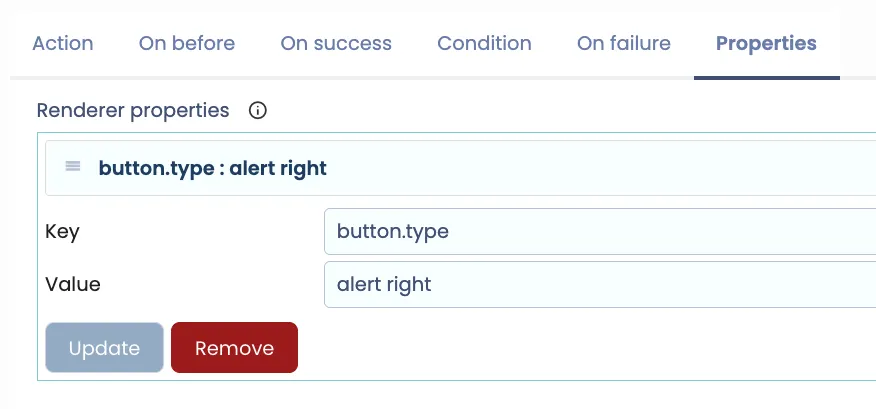
You can place a Detail view Table operation at the bottom right of a form, just like "Cancel incident" on Incident record, by adding a Renderer property. The button can also take in colour Red by having property of "alert". Example below:
Add:
Key = button.type
Value = alert right