Activating email auto replies for closed tickets
By default and also a typical configuration, the Incident managementIncident management and ITSM Request managementITSM Request management processes do not allow updates to Closed records. This includes updates from inbound emails, where the default behaviour is not to add the email contents into the already Closed records.
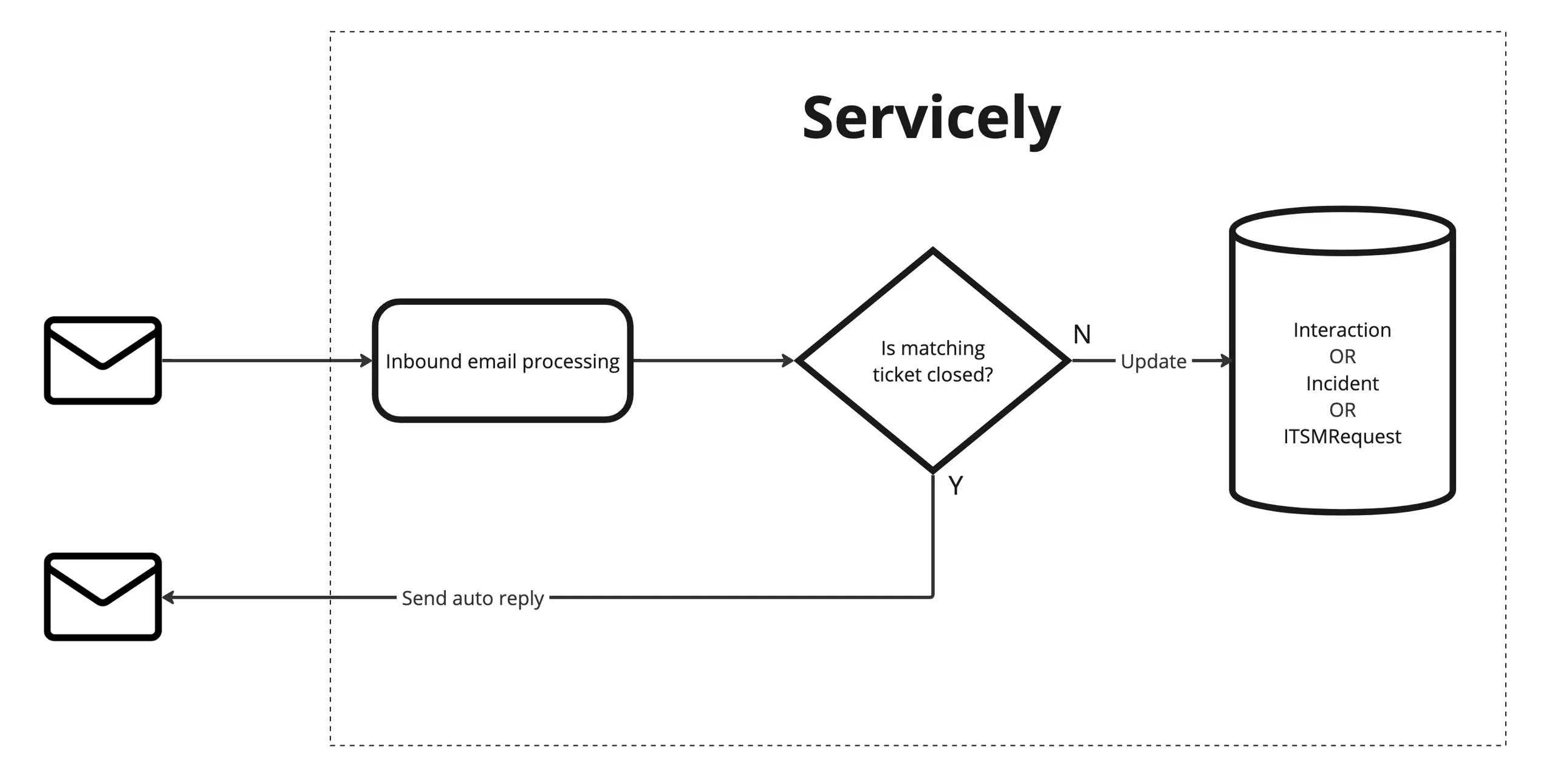
However, Servicely has an out of box capability that you can activate, to automatically send an auto reply email to an email sender, should they email Servicely for a record (either Interaction ProcessInteraction Process, Incident or ITSM Request) that is already closed. The auto reply email Servicely sends out, will then provide an option to raise a new Interaction ticket.
Flow of emails/information
If activated in the out of box form, the below image shows the expected flow of emails and information at a high level, in and out of Servicely purely from the auto reply email perspective.
Example of sent Email
Below shows a screenshot of a portion of the out of box auto reply email. In this example it highlights how Servicely emailed a user about an Incident, but by the time the recipient replied, their Incident has been closed off.
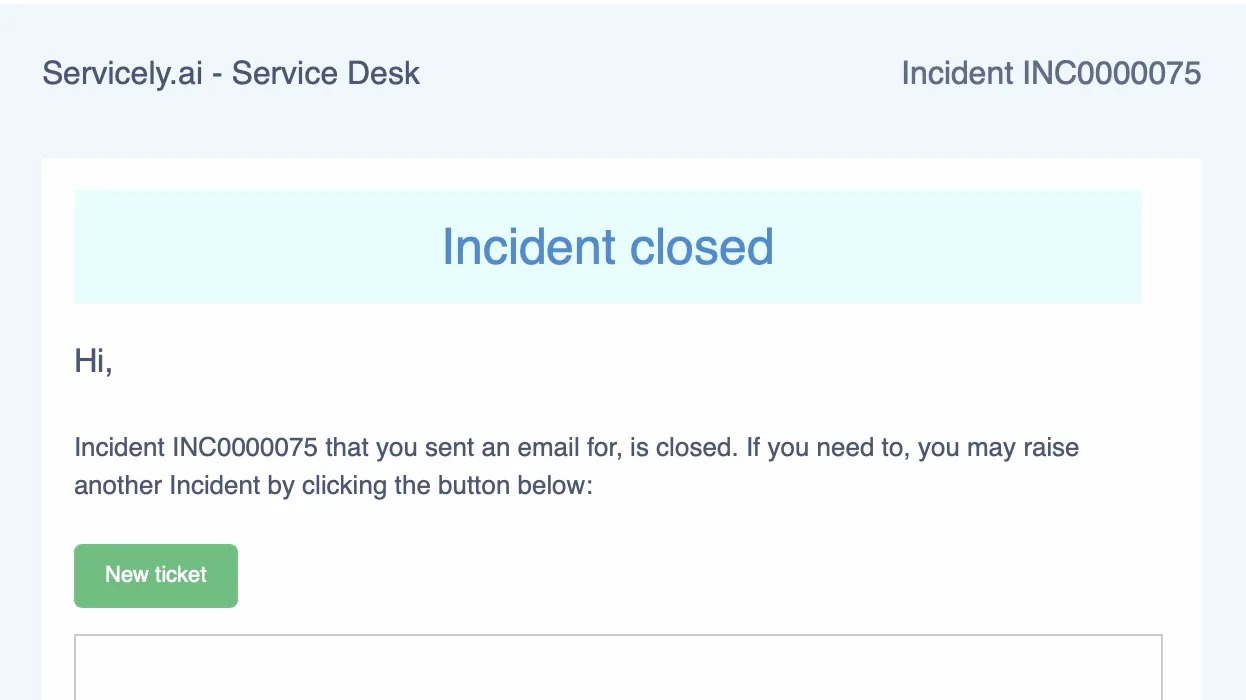
Clicking on the “New ticket” button on the email body, it will bring up the user’s default email application and will result in an email response that can be sent back to Servicely to create a new Interaction. The new interaction will have a customer communication journal added that a link back to the closed Incident for historical reference.
How to activate
Change set
If you are activating these rules in a non production environment, with the intention of migrating the changes to another Servicely environment (such as Production), please ensure that you had created a change setchange set and set it to track configurations.
Application properties
The Application propertiesApplication properties below have value of false, out of box. You may set them to true as required.
Property name | Purpose |
|---|---|
interaction.auto_reply.enabled | Set to true, if Servicely should send an auto reply to anyone replying to a notification linked to an Interaction that's already classified and the target record is also closed. |
incident.auto_reply.enabled | Set to true, if Servicely should send an auto reply to anyone replying to a notification linked to an Incident that's already closed. |
itsm_request.auto_reply.enabled | Set to true, if Servicely should send an auto reply to anyone replying to a notification linked to an ITSM Request that's already closed. |
The two application properties below should point to the respective Outbound notification template’s IDs in the next section of this documentation
If you want to create your own outbound notification templates to send as the auto reply emails, then ensure you place the IDs of those outbound notification records, into the respective application properties below.
Property name | Purpose |
|---|---|
incident.auto_reply.notification_template_id | Servicely record ID of Outbound notification template for auto reply on closed Incidents. Default value is e67e8cafe18f11eea72b0242ac140026 |
itsm_request.auto_reply.notification_template_id | Servicely record ID of Outbound notification template for auto reply on closed ITSM Requests. Default value is 940f1d6ce19111eea72b0242ac140026 |
Outbound notification template
Please review the following notification templates and if you need to, you can tweak the its configuration such as the email content, that includes the header/footer accordingly.
Notification | URL | Purpose |
|---|---|---|
Incident - Auto reply for closed incidents | #/OutboundNotification/e67e8cafe18f11eea72b0242ac140026 | Notification to send as an auto reply, to inbound emails sent to a closed Incident |
ITSM Request - Auto reply for closed requests | #/OutboundNotification/940f1d6ce19111eea72b0242ac140026 | Notification to send as an auto reply, to inbound emails sent to a closed ITSMRequest |
System inbound action
Please check and ensure the following inbound action record is already active. If not, please set the Active flag to be Yes and save your changes.
Inbound Action | URL |
|---|---|
Create new interaction from auto reply closed email | #/SystemInboundAction/dbde5e52285111efbd0c12230e323c36 |
Other configuration
This requires Javascript, and general Servicely platform knowledge
Existing auto reply
- If you want to update the condition on when an auto reply email is sent, you will need to update the respective Inbound message configurations for the processes. E.g. They are below:
- Incident - located in https://<instance_name>.servicely.ai/#/InboundMessage/34a288deb83111efade82622bf02a1ea
- ITSMRequest - located in https://<instance_name>.servicely.ai/#/InboundMessage/c0a804c369c11f978169c169211c03e2
- Interaction - located in https://<instance_name>.servicely.ai/#/InboundMessage/c0a804c369c11f978169c1689b8703d2
- If you want to create your own outbound notification template for the auto reply email that is sent out, ensure the respective application properties “incident.auto_reply.notification_template_id” and/or “itsm_request.auto_reply.notification_template_id” are updated to reference the Servicely ID of your new outbound notification template
- If you want to change how Servicely handles the reply coming back from the auto reply email, then you can update the System inbound action configuration. It is located in https://<instance_name>.servicely.ai/#/SystemInboundAction/dbde5e52285111efbd0c12230e323c36
Custom auto reply
- If you want to make similar auto reply functionality available to other processes (or custom ones), then we recommend that you follow the out of box code we have for Incident/ITSMRequest/Interaction and come up with your own:
- Application properties
- Outbound notification template
- [OPTIONAL] System inbound action
- [OPTIONAL] Script library based on ITSMWorkEmailUtils.
Reference documents
- General information on Inbound message is outlined here in Inbound email processingInbound email processing
- General information on outbound notification is outlined here in Outbound notificationsOutbound notifications