TableChecks
Overview
The TableChecks configuration object is a powerful tool that governs the behavior of various system operations by allowing the selective activation or deactivation of multiple predefined settings. These settings encompass aspects such as permissions, validations, event triggers, and system protections, each of which influences how the system processes and interacts with data. By configuring the TableChecks, users can tailor the execution environment to suit specific needs, enhancing script performance, ensuring data integrity, and maintaining security protocols. This flexibility empowers administrators to manage system functionalities effortlessly, ensuring that only the necessary checks and processes are executed during any given operation.
There are a number of named TableChecks that encapsulate the different data access and security patterns. Examples of the different access patterns include:
- An end user interacting with the system (listing, creating, updating records through the UI) - TableChecks would have all the permission, restrictions, field value, workflow, trigger, and events enabled.
- An integration creating/updating records - TableChecks may have specific permission, restrictions, or workflow operations disabled, depending on the integration and its requirements.
- An administrator performing bulk data import or data cleansing operations - TableChecks may have all of the restrictions, workflows, validation etc. disabled to allow the action.
A set of the named TableChecksare listed in a following section of this document.
WARNING:
Avoid using current.tableChecks(...) in server scripts that are part of the application lifecycle, such as triggers, workflows, or field value scripts. Doing so can overwrite the default set of checks applied to the record, meaning that from that point forward, critical restrictions, validations, field values, and system field updates may be bypassed. This can lead to unintended behaviours downstream in the trigger/validation/workflow paths. The current object is typically pre-loaded with user perspective-specific restrictions, ensuring security and data integrity. Disabling these checks indiscriminately can compromise these safeguards and affect the operation's consistency across the entire lifecycle. Use caution and ensure proper understanding of the script's context before altering table checks on shared objects like current. For the case where you need to update a protected field on a shared object like current, use the withTableChecks method, as this scopes the different set of TableChecksto a specific block.
TableCheck Options
The auditEnabled flag within TableChecks cannot be disabled in server scripts and remains permanently enabled, ensuring consistent auditing of operations across the system.
The following parameters can be adjusted within the TableChecks object:
Record Creation/Update
Tablecheck Name | Description | Example Use Cases |
|---|---|---|
withFieldDefaultValuesEnabled | Enables or disables the evaluation of the ‘Field Default Value’ functionality. Table and Field Properties | Data import, Integration, Bulk update Administrators may choose to turn off the evaluation of ‘Field Default Values’ when creating or updating information outside of the normal user flow. |
withEvaluateFieldValues | Enables or disables the evaluation of field values based on custom logic. Open Screenshot 2024-11-18 at 4.19.28 PM.png
| Data import, Integration, Bulk update Administrators may choose to turn off the evaluation of ‘Field Values’ when creating or updating information outside of the normal user flow. |
withValidationEnabled | Enables or disables the evaluation of the ‘Field validation (server)’ logic Open Screenshot 2024-11-18 at 4.21.10 PM.png | Data import, Integration, Bulk update Administrators may choose to turn off the evaluation of ‘Field Validation’ when creating or updating information outside of the normal user flow. |
Security
TableCheck Name | Description | Example Use Cases |
|---|---|---|
withApplyRestrictions | Enables or disables the evaluation of the ‘Table record restrictions’ functionality. Open Screenshot 2024-11-18 at 4.24.36 PM.png | Data import, Integration, Bulk update Administrators may choose to turn off the evaluation of ‘Table Record Restrictions’ when creating or updating information outside of the normal user flow. Protected data lookup (e.g. in Triggers) Administrators may choose to lookup information that the end user does not have permission to see. E.g. looking up users, groups, CMDB items that the end user can not normally access. |
withApplyTenancyRestrictions | Enables or disables the evaluation of the Multi-Tenancy restriction functionality. | Data import, Integration, Bulk update Administrators may choose to turn off the evaluation of ‘Multi-Tenancy Restriction’ when creating or updating information outside of the normal user flow. Protected data lookup (e.g. in Triggers) Administrators may choose to lookup information that the end user does not have permission to see. E.g. looking up users, groups, CMDB items that the end user can not normally access. |
withCheckPermissions | Enables or disables the evaluation of the Permission Model. Open Screenshot 2024-11-18 at 4.26.33 PM.png
| Data import, Integration, Bulk update Administrators may choose to turn off the evaluation of ‘Multi-Tenancy Restriction’ when creating or updating information outside of the normal user flow. Protected data lookup (e.g. in Triggers) Administrators may choose to lookup information that the end user does not have permission to see. E.g. looking up users, groups, CMDB items that the end user can not normally access. Related record generation Administrators may choose to create related records that the end-user themselves are not permitted to create of view. E.g. creating Time Card entries, even if the end user does not have permission to see or update Time Cards. |
withPreventUpdates | Prevents any modifications to existing records to protect data integrity. |
|
Trigger, Events and Workflow
TableCheck Name | Description | Example Use Cases |
|---|---|---|
withFireEventsEnabled | Enables or disables the firing of the event processing logic. | Data import, Bulk update Administrators may choose to turn off the 'Fire events’ when creating or updating information outside of the normal user flow. Typically, this would only be advisable in the case where large amounts of data needed to be imported or updated and would typically be done intentionally as a performance optimisation. |
withTriggersEnabled | Enables or disables the evaluation of the ‘Trigger’ functionality. Trigger | Data import, Integration, Bulk update Administrators may choose to turn off the evaluation of ‘Trigger’ when creating or updating information outside of the normal user flow. |
withWorkflowOperationsEnabled | Enables or disables the execution of Workflows. | Data import, Integration, Bulk update Administrators may choose to turn off the evaluation of ‘Workflow operations’ when creating or updating information outside of the normal user flow. |
System and Managed Field Workflow related
TableCheck Name | Description | Example Use Cases |
|---|---|---|
withManagedFieldsProtected | Enables or disables protection of ‘Managed Fields’. Managed fields (e.g. WorkflowStatus, PreviousTransition, PreviousWorkflowStatus, QuestionsSource, SystemRealm, SystemRealmCIDR) are explicitly marked as protected and are not permitted to be updated. | Data import, Integration, Bulk update Administrators may choose to turn off the protection of ‘Managed fields’ when creating or updating information outside of the normal user flow. |
withSystemFieldsProtected | Enables or disables protection of ‘System Fields’. System fields (e.g. ID, UpdatedOn, CreatedOn, Version, and TableClass) are explicitly marked as protected and are not permitted to be updated. | Data import, Integration, Bulk update Administrators may choose to turn off the evaluation of ‘System Fields’ when creating or updating information outside of the normal user flow. |
withUpdateSystemFields | Enables or disables the automatic update of 'System Fields' (e.g. ID, UpdatedOn, CreatedOn, Version, and TableClass) | Data cleanup Administrators may choose to turn off the automatic update of ‘System Fields’ when correcting data issues, without forcing the update of the ‘Updated on’ and ‘Updated By' values. |
Predefined Variables
The TableChecksWrapper provides preconfigured sets of variables to assist in managing these checks:
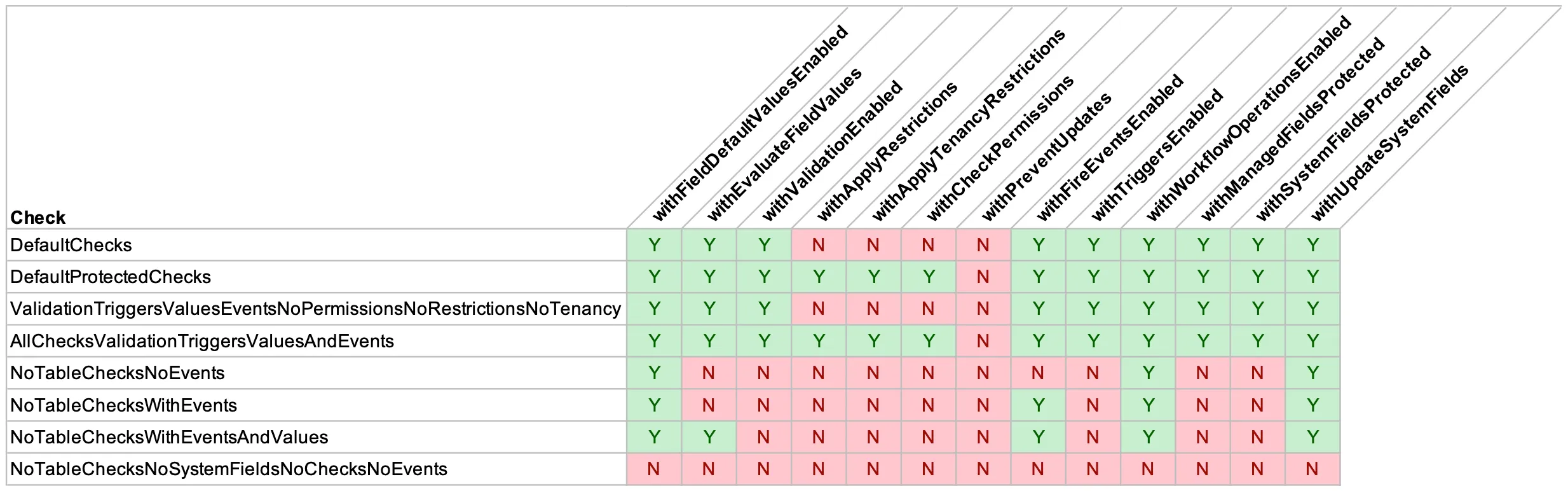
DefaultChecks (Alias for ValidationTriggersValuesEventsNoPermissionsNoRestrictionsNoTenancy)
This is the default set of TableChecks that are applied to records when accessed from the Scripting environment when using Table API. This API
Enables validations, event triggers, and field value evaluations, but disables permissions and all restrictions, both general and tenancy-specific.
DefaultProtectedChecks (Alias for AllChecksValidationTriggersValuesAndEvents)
This is the default set of TableChecks that are applied to end user records, or from the Scripting environment when using TableProtected API.
Activates all system checks, including validations, event triggers, field value evaluations, and protection for managed and system fields. Enforces both general and tenant-specific restrictions and permissions.
NoTableChecksNoEvents
Disables permissions, validations, event triggers, and restrictions, while enabling audit and updates to system fields. Supports field default value evaluations for minimal interference.
   withApplyRestrictions=false
   withApplyTenancyRestrictions=false
   withAuditEnabled=true                // TRUE
   withCheckPermissions=false
   withEvaluateFieldValues=false
   withFieldDefaultValuesEnabled=true   // TRUE
   withFireEventsEnabled=false
   withPreventUpdates=false
   withManagedFieldsProtected=false
   withSystemFieldsProtected=false
   withTriggersEnabled=false
   withUpdateSystemFields=true          // TRUE
   withValidationEnabled=false
   withWorkflowOperationsEnabled=true   // TRUE
NoTableChecksWithEvents
Disables permissions, validations, triggers, and restrictions, but keeps event processing, auditing, and field value operations enabled.
   withApplyRestrictions=false
   withApplyTenancyRestrictions=false
   withAuditEnabled=true                // TRUE
   withCheckPermissions=false
   withEvaluateFieldValues=false
   withFieldDefaultValuesEnabled=true   // TRUE
   withFireEventsEnabled=true           // TRUE
   withPreventUpdates=false
   withManagedFieldsProtected=false
   withSystemFieldsProtected=false
   withTriggersEnabled=false
   withUpdateSystemFields=true          // TRUE
   withValidationEnabled=false
   withWorkflowOperationsEnabled=true   // TRUE
NoTableChecksWithEventsAndValues
Deactivates permissions, validations, triggers, and restrictions, while retaining event processing, auditing, and default field value evaluations.
   withApplyRestrictions=false
   withApplyTenancyRestrictions=false
   withAuditEnabled=true                // TRUE
   withCheckPermissions=false
   withEvaluateFieldValues=true         // TRUE
   withFieldDefaultValuesEnabled=true   // TRUE
   withFireEventsEnabled=true           // TRUE
   withPreventUpdates=false
   withManagedFieldsProtected=false
   withSystemFieldsProtected=false
   withTriggersEnabled=false
   withUpdateSystemFields=true          // TRUE
   withValidationEnabled=false
   withWorkflowOperationsEnabled=true   // TRUE
NoTableChecksNoSystemFieldsNoChecksNoEvents
Disables all checks except auditing, including updates to system fields and event handling, focusing solely on maintaining audit logs.
   withApplyRestrictions=false
   withApplyTenancyRestrictions=false
   withAuditEnabled=true                  // Only 'audit` is enabled.
   withCheckPermissions=false
   withEvaluateFieldValues=false
   withFieldDefaultValuesEnabled=false
   withFireEventsEnabled=false
   withPreventUpdates=false
   withManagedFieldsProtected=false
   withSystemFieldsProtected=false
   withTriggersEnabled=false
   withUpdateSystemFields=false
   withValidationEnabled=false
   withWorkflowOperationsEnabled=false
Functions
Users can override attributes of these predefined table checks through the use of functions:
/**
 * Determines whether restrictions should be applied to table records to ensure compliance with defined criteria.
 */
withApplyRestrictions(apply: boolean): TableChecks;
/**
 * Enforces restrictions specific to tenant environments to maintain data segregation and security.
 */
withApplyTenancyRestrictions(apply: boolean): TableChecks;
/**
 * Controls the enforcement of permission checks, ensuring users have the necessary access rights.
 */
withCheckPermissions(apply: boolean): TableChecks;
/**
 * Enables or disables the evaluation of field values based on custom logic.
 */
withEvaluateFieldValues(apply: boolean): TableChecks;
/**
 * Allows the application of default values to fields during record creation for consistency.
 */
withFieldDefaultValuesEnabled(apply: boolean): TableChecks;
/**
 * Regulates the firing of events to facilitate communication and process handling.
 */
withFireEventsEnabled(apply: boolean): TableChecks;
/**
 * Prevents any modifications to existing records to protect data integrity.
 */
withPreventUpdates(apply: boolean): TableChecks;
/**
 * Protects managed fields like WorkflowStatus, PreviousTransition, PreviousWorkflowStatus, QuestionsSource, SystemRealm, and SystemRealmCIDR.
 */
withManagedFieldsProtected(apply: boolean): TableChecks;
/**
 * Protects system-critical fields including id, SID, UpdatedOn, CreatedOn, Version, and TableClass from unauthorized changes.
 */
withSystemFieldsProtected(apply: boolean): TableChecks;
/**
 * Indicates whether triggers should be active to automatically respond to events.
 */
withTriggersEnabled(apply: boolean): TableChecks;
/**
 * Manages updates to essential system fields such as id, SID, UpdatedOn, CreatedOn, Version, and TableClass.
 */
withUpdateSystemFields(apply: boolean): TableChecks;
/**
 * Manages the validation processes to ensure data integrity and consistency.
 */
withValidationEnabled(apply: boolean): TableChecks;
/**
 * Enables the execution of workflow operations to automate business processes efficiently.
 */
withWorkflowOperationsEnabled(apply: boolean): TableChecks;
Usage Examples
1. Applying TableChecks in a Table Query
Scenario: You need to update a specific record in the "Incident" table, disabling certain system field updates while performing the operation.
Table("Incident")
    .EQUAL("Number", "INC0000249")
    .tableChecks(TableChecks.DefaultChecks.withUpdateSystemFields(false))
    .forEach(rec => {
        rec.ShortDescription("Update description")
            .update();
    });
Explanation: By setting up TableChecks during the initial query, all records returned are processed under the specified conditions. In this example, system field updates are disabled, allowing the update to focus solely on the intended field changes without affecting system metadata.
2. Modifying current with TableChecks
Scenario: Update a protected field in the current record where default restrictions are imposed, typically in scripts where current is shared across trigger, workflow, or field value scripts.
current.withTableChecks(TableChecks.NoTableChecksNoSystemFieldsNoChecksNoEvents, () => {
    current.ProtectedField("new value");
});
Explanation: This setup allows temporary override of the default checks on the current object, which is preloaded with user-imposed restrictions. By employing NoTableChecksNoSystemFieldsNoChecksNoEvents, the script can modify protected fields without the usual restrictions, ensuring that changes are localized to the block and do not disrupt other script functionalities.
Considerations
- Shared Objects: The withTableChecks method is optimal for shared/common objects like current to ensure that the operation respects the appropriate level of checks without affecting other scripts that may use the same object.
- Multiple Record Operations: When performing operations on multiple records, initiate TableChecks at the start of the query process. This prevents redundant checks and optimizes script performance by applying necessary conditions only once for all the records processed.
- Lifecycle and Scope Awareness: It's important to understand the lifecycle and scope of TableChecks within your scripts. Proper application ensures that each operation is conducted with the required checks, preventing unintended side effects or security issues while maintaining the intended functionalities.